



WordPress Page 17
arrange in order

Build Custom Anti-Spam Logic with WordPress Hooks Beyond Plugins!
This article discusses how to use WordPress hook system to build custom anti-spam solutions. Through the preprocess_comment, registration_errors and other core hooks of the actual application, detailed analysis of comment filtering, user registration verification and other key protection links ...

Learn the right way to turn on DISALLOW_FILE_EDIT to make your WordPress more secure!
Many WordPress websites have been tampered with because attackers inserted malicious code using the backend theme/plugin editor. By configuring DISALLOW_FILE_EDIT, a core security constant, you can disable this feature at the source and effectively strengthen your website security.

Hello Biz: A WordPress Theme Tailored for Beginners
Hello Biz is a WordPress theme designed for small businesses and freelancers that is easy to use and offers professional templates and widgets to help you quickly build a responsive website and launch your online business.

How to Avoid Pricing Mistakes: Tips for Setting Up the Multi-Price Feature for WordPress Products
Learn how to avoid common pricing mistakes and improve product sales performance by properly configuring WordPress' multi-price feature. This article describes multi-price setup tips and plugin usage to help e-commerce merchants improve conversion rates and customer satisfaction.

Getting to grips with the WordPress write test mechanism: the significance of the temp-write-test file
Comprehensively explains the principle and role of WordPress temp-write-test file generation, to understand its significance in the detection of server write permissions, automatic updates and system security, to help you better maintain stable operation of the site.

The 5 "Hidden Corners" of WordPress Anti-Spam You Need to Guard
Many WordPress administrators have a cognitive misconception that they can rest easy after installing a comment anti-spam plugin. They underestimate the sophistication of modern spambots, programs that systematically scan all open interfaces of a website for injection vulnerabilities. Protecting only comment modules such as...

What image formats are supported by Imagify vs WP Smush and how does WebP support compare?
Want to improve the loading speed of your WordPress website? Image optimization is a critical first step. We compare in detail the real performance of Imagify and WP Smush in terms of format support and WebP conversion. The article analyzes the advantages and disadvantages of the two plugins and gives a proposal based on different budget...
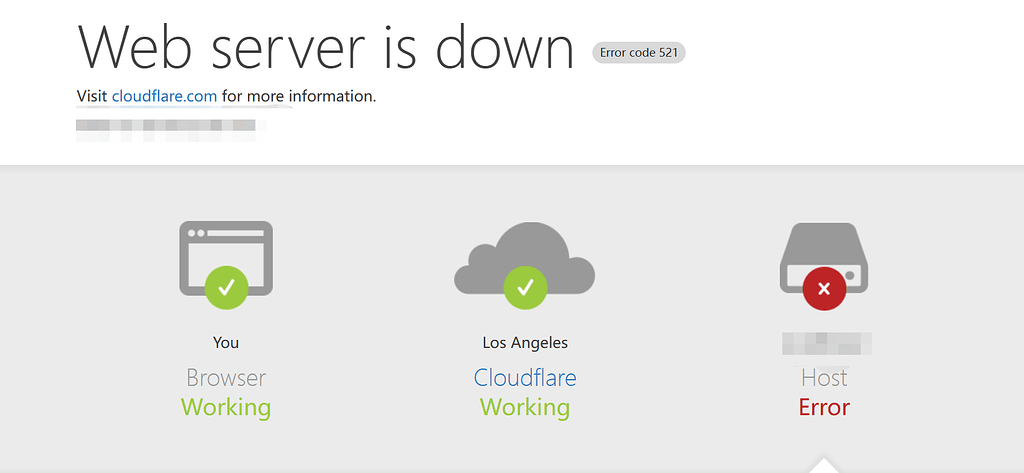
HTTP 521 Causing Website Unavailability? How to Create Emergency Pages and Implement Access Downgrade
When HTTP 521 errors render websites inaccessible, emergency pages and access degradation can ensure basic availability. This article provides strategies for rapid root cause identification, emergency response, and stability optimization.

Pagoda Panel WordPress Blog Blocking Mainland IPs
This guide details how to block mainland China IPs using Nginx and Pagoda Panel to secure cross-border e-commerce websites and comply with regional website access policies. Learn how to set up IP blacklists, customize HTTP response status codes (e.g. 403 Forbidden) to prevent unwanted regional...

Imagify Plugin User Guide: Easily Optimize Images to Improve Site Speed and SEO Performance
Imagify is a powerful WordPress image optimization plugin that supports automatic compression and batch optimization of images, and is able to convert images to an efficient WebP format, which significantly improves website loading speed, optimizes website performance, and improves SEO rankings.

Avada page title bar settings in detail: from basic to advanced
This article explains how to set and customize page title bar in Avada theme, from enabling/disabling title bar to adjusting style, font, background and breadcrumb navigation. Enhance your website's user experience and SEO results with these settings!

WordPress directory generated temp-write-test * and other 0 byte file solution
Suddenly found WordPress wp-content directory generated a lot of temp-write-test* 0 byte file, although 0 bytes do not take up hard disk capacity, but the number is too large, sometimes up to hundreds of thousands of files, very much affecting the operation of the site, this article will describe how to prohibit the generation of this ...
Beginner's Bible: Master WordPress image sizing and optimization methods to quickly improve site performance
Understand WordPress image sizes and why they are generated, and learn how to manage and optimize image sizes to improve website loading speed and reduce storage footprint. This article will also cover how to compress multiple image sizes using image optimization tools to ensure website performance and user experience.

How to Write Blog Posts Using WordPress Default Theme and Gutenberg Editor (02)
In this post, we'll dive into how to write blog posts using WordPress' default theme and the Gutenberg Editor. The Gutenberg Editor, the built-in editor for WordPress, uses a block system to provide a way for users to...

How to Improve the Loading Speed of Your WordPress Site
When your WordPress website loads slowly, there can be a variety of reasons. In addition to insufficient server configuration, here are some common reasons that may cause your website to load slower and how to fix them: Too many plugins: Installing too many plugins may cause the web...

The Easy Way: How to Add Subscriptions to WooCommerce
Learn how to add subscriptions to WooCommerce in WordPress. Easily automate billing, subscription product setup, and membership plan management with the free plugin YITH WooCommerce Subscriptions to create a stable income e-commerce system.

Astra Theme Settings Explained: How to Easily Manage the Appearance of Your Website (10)
Astra theme is known for its lightweight and high customizability, but for novice users, its settings may feel a bit complicated for the first time. In this article, we will introduce the main settings location and functions of Astra theme in detail to help you easily manage and customize the appearance and layout of your website. Whether it's row...

Detailed tutorial on how to set up multi-currency functionality in WooCommerce: manual selection vs. automatic switching (02)
So let's move on today to finish talking about some of the ways to set up multi-currency, with manual selection and automatic switching, but there was a little hiccup in sharing this tutorial, and the article is a little long, so please bear with us. Steps → Website Backend → Woocommerce → Currency Sw...

WordPress Bulk Modify Post Publishing Time
Bulk modifying the posting time of a post is an important and useful feature in WordPress administration. Why modify the time? Batch modifying the post publishing time can optimize the order of post content display, so that the post publishing time of a certain board can be advanced or pushed back. First of all, I...

Say goodbye to hand slips: How to prevent team member misuse disasters with DISALLOW_FILE_EDIT?
In WordPress teamwork, internal misuse is more destructive than external attacks. A single code error can lead to website paralysis.DISALLOW_FILE_EDIT provides effective permission control solution for enterprises by disabling the background file editing function to protect the stable operation of business...

How to Change WordPress User IDs
In the process of using WordPress, some users are deleted, ID is empty, then want to register behind the user, use these unoccupied ID, how do we go to modify it? Then this article, will introduce the following if the modification of WordPress user ID. Just funtio...

Imagify vs WP Smush: WordPress Image Optimization Plugin Comparison Analysis
Compare Imagify and WP Smush, two WordPress image optimization plugins, analyze their compression effect, WebP support, performance differences and applicable scenarios to help you choose the most suitable image optimization tool for your website.

How to Create Custom Page Templates in WordPress
Learn how to create custom page templates in WordPress, build unique page layouts, optimize user experience and SEO performance with the Full Site Editor (FSE) and Elementor Page Builder, no programming skills required!

WP Rocket plugin configuration common problems and solutions
WP Rocket plugin is a powerful WordPress caching tool, but you may encounter some common problems in the configuration process. This article provides detailed solutions to help you solve the cache does not take effect, delayed loading problems, CDN compatibility, etc., to ensure that the site performance optimization without worry.

WordPress Accelerated Website Images to webp format
Many times, our WordPress open speed is very slow, is due to too many pictures in the web page, the server's bandwidth itself is not enough to cause this situation, and then a check, the web page in the picture is too big, each picture is a large hundreds of K, or even 1-2M, open the web page to the site to load this...

WordPress 6.5 now supports plugin dependencies, which makes it easier for developers to manage relationships between plugins.
WordPress 6.5 now enables dependencies between plugins. WordPress' extensibility is one of its most useful features, and it does this through plugins and the Hooks API. Many plugins are built on top of other plugins and used to extend their functionality....

WordPress not logged in users (visitors) only show a picture in the post Used to guide the user to sign up
There are times when we publish a file and add multiple images, but how do we make it so that unlogged in users (visitors) can only see one image? After the user logs in, he can see all the pictures in the article. Then this article introduces the following, modify the file code to achieve this effect, so that you can guide...

One-Click WordPress Installation: The Easy Way to Use Pagoda Panels
Welcome to the practical chapter of Creating Your Digital World! Today, we're going to explore how to quickly deploy WordPress by utilizing the one-click install feature in the Pagoda Panel, which makes installing WordPress on a server a breeze with its easy and efficient administration....

Why Your WordPress Site Needs Akismet Anti-spam and Jetpack
WordPress is a powerful content management system, but as website traffic increases, it also becomes an easy target for spam comments and security attacks. That's why it's crucial to install plugins like Akismet Anti-Spam and Jetpack. Akismet Anti-s...

WordPress version 6.5 has performance improvements for internationalized (I18N) multilingual translations.
WordPress version 6.5 features several internationalization (i18n) improvements, which this developer note will focus on. Localized Translation System with Improved Performance Over the past year, WordPress contributors have carefully studied the existing internationalization (i18n) system...

 简体中文
简体中文  English
  日本語
日本語  Français
  Español



