


WordPress Tutorial Page 91
The "WordPress Tutorials" feature takes you in-depth understanding of WordPress, from the basic installation, theme and plug-in configuration, to SEO optimization and site security, covering all aspects of the core knowledge and practical skills needed to build a site. Whether you are a novice or an experienced developer, you can find the appropriate tutorials to help you easily master the use of WordPress and advanced operations.
arrange in order

WordPress source code - jquery-plugins (jquery.query.js)
1 /** 2 * jQuery.query - Query String Modification and Creation for jQuery 3 * Written by Blair Mitchelmore (blair DOT mitchelmore AT gmail DOT com) 4 * Licensed under the WTFPL (h... Licensed under the WTFPL (h...

How to Fix Sidebar Error Below Content in WordPress
When WordPress templates use a two-column layout to display content and sidebars, a 'sidebar below tolerance error' may occur. Due to a slight change in the code, the sidebar starts appearing below the content instead of next to it. What causes WordPress sidebar content errors? Side ...

Why Elementor Outperforms the Competition: An In-Depth Look at Its Core Strengths
In this article, we will explore in detail why Elementor is better than the rest of the competition and what it has to offer in terms of robust functionality and user-friendly experience. The WordPress Advantage WordPress has an unrivaled collection of themes, plugins, and extensions.Elementor takes full advantage of...
How to Migrate WordPress to a New Server Without Downtime
Many webmasters want to know how to safely migrate their website to a new server. This tutorial organizes a step-by-step procedure for newbies, so some plugins will be used. Let's take a look together! Step 1: Choose a new WordPress server If even after optimizing ...

How to Optimize Images and Multimedia Content for Your WordPress Website
In WordPress websites, images and multimedia content are crucial for website SEO. They not only enhance the user experience, but also deliver information effectively. However, unoptimized images and multimedia content can dramatically degrade website performance and affect loading speed, which is detrimental to SEO.How to optimize...
How to Fix Destination Folder Already Exists Error in WordPress
What causes the Target Folder Already Exists error in WordPress? When installing a plugin or theme, a "Destination folder already exists" error occurs in WordPress, but the folder for those files already exists. WordPress will then cancel the installation and display the following error...

Recommended: TranslatePress - WordPress multilingual plugin selection
With the rapid expansion of global trade, it is becoming increasingly important for businesses and individuals to have a multilingual website. When you build a website with WordPress, you can utilize a multilingual plugin such as TranslatePress. this is a powerful plugin that helps you easily put web...

WordPress source code - jquery-plugins (jquery.color-2.1.1.js)
1 /*! 2 * jQuery Color Animations v2.1.1 3 * https://github.com/jquery/jquery-color 4 * 5 * Copyright 2012 jQuery Foundation and other contributors 6 * Released under the MIT licen...

WordPress website multi-language settings in detail
Want your WordPress website to support multiple languages? Currently, more than 43% internet sites are supported by WordPress, and many of them need to serve users in multiple languages. This article will teach you how to easily build a multilingual WordPress website. We will show you...

Is the seemingly harmless 301 redirect a "hidden killer" that causes slow loading?
Do 301 redirects affect website speed? This post provides an in-depth analysis of the working mechanism of redirects, causes of loading delays, common misconceptions, and developer optimization suggestions to help you balance SEO and performance!

WordPress Coding Standards
Coding standards in WordPress development are essential for a strong and sustainable code base. They are guidelines and conventions that developers adhere to when writing code, helping to enhance collaboration, simplify maintenance, and ensure overall reliability. In addition, coding standards prevent common...

How to Ensure Security and Privacy for WordPress Multi-Domain Sites
This article discusses how to ensure the security and user privacy of WordPress multi-domain websites through key strategies, from technical measures to cross-domain management, to ensure the safe and smooth operation of websites.
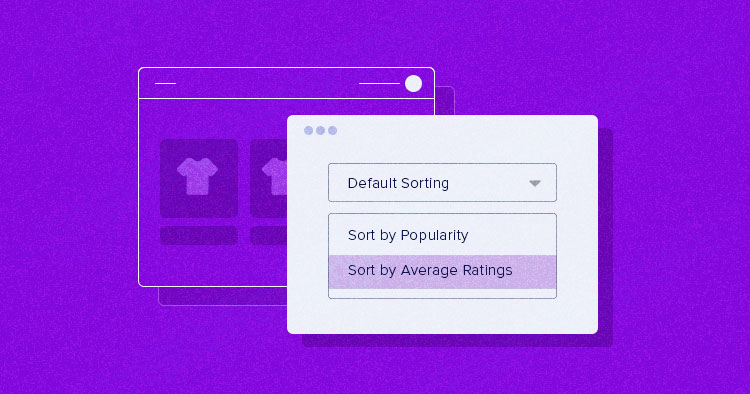
How to Setup and Optimize Product Sorting in WooCommerce to Enhance User Experience
WooCommerce comes with some common product sorting options for various types of product display. The following are some of the sorting options provided by WooCommerce by default: Default Sort (Custom Sort + Rank): This is the default sorting option in WooCommerce, combining...

Generic API - Dashboard Widgets
We often hear about the WordPress Dashboard Widgets API, so what exactly is this. Learn what this API is used for, why it's so important for your WordPress site, and how to easily add widgets to your dashboard. Enhance your...

How to implement automatic closing of the navigation menu after clicking an anchor link in Elementor
Setting up a directory to close after clicking an anchor link in Elementor (such as a collapsed menu or navigation menu) can be done using some custom code. Here are the steps: Step 1: Edit Individual Post Templates Log in to your WordPress dashboard. Navigate to the Elementor template >...

What is a VPS?
Blend Hosting is ? Blend Hosting , a Malaysian hosting provider, offers cloud servers and dedicated servers, mainly with Malaysian VPS (Linux VPS and Windows VPS respectively). Its data centers are located in Sai Cheng and Kuala Lumpur, and the server room is located in K...

Fast Ranking Boost: How to Automate WordPress SEO
One of my clients who does cross-border work just asked me if SEO can be automated and the process streamlined so he can have more time for other things. In our experience, SEO can automate a lot of processes, which can save time and can be effective in improving your site's rankings. But that doesn't mean it can be...

How to Optimize Elementor Settings for Better Performance
1. Install Elementor and Configure Settings After installing Elementor, go to Settings and configure it appropriately: General Tab: Select the post types for which you want to use Elementor. If some custom post types (CPTs) do not require Elementor, turn off...

How to Fix 503 Service Unavailable Error in WordPress: Detailed Guide
Seeing a 503 Service Unavailable error on your WordPress site? This is a frustrating issue because it doesn't provide any specific reason for the error. In this article, we will show you how to fix 503 Service Unavailable error in WordPress. 503...

How to Implement Responsive Image Processing Using Generic APIs
In this post, we're going to explore the Responsive Images API in WordPress together.We'll mention what responsive images are, why they're used, how WordPress makes these images work, and what to do if you want to customize them. What are responsive...

How to Launch Your WordPress Site Smoothly, From Domain Name Selection to Publishing Pages
Launching a fully functional WordPress website may seem like a complicated process, but by systematically following the steps below, you too will be able to easily build and design an efficient and aesthetically pleasing website. This article will detail everything from choosing a domain name to publishing your first page...
Gutenberg Version 18.7 Update: New Features and Enhancements
Gutenberg version 18.7 mainly fixes a few issues, but also includes some great new features and enhancements. Here are the highlights of the update: Drag and Drop Grid Items in Manual Mode For more precise manipulation of the grid, when using manual mode, all grid items are now...

How to create flexible custom one-page templates with Elementor Flexbox containers: a detailed tutorial
Learn how to create custom one-page templates using Elementor's Flexbox container with detailed step-by-step tutorials to provide flexible layouts and modern designs for blog posts, product pages, or service pages, optimizing user experience and responsive results.

How to parse Gutenberg content in WordPress
Gutenberg is the default editor for WordPress. This editor allows content to be created and designed using discrete blocks of text, images, video, and other website elements through a drag-and-drop interface. This approach enhances the flexibility and design capabilities of WordPress. Using the REST API ...

How to Achieve Efficient Inventory Management with WooCommerce and Attribute Stock Plugin
WooCommerce provides a basic set of inventory management tools to track product availability and avoid overselling or running out of stock. For stores with complex inventory needs, WooCommerce's built-in functionality may not be fully sufficient. In this article, we'll detail how Woo...

WordPress Site Acceleration: A Guide to Caching Settings
WordPress website running slow? This problem has been around since the inception of WordPress. But now, we have a standardized solution. 6 Factors of Slow WordPress Website Choose a good server provider 2. Use a lightweight WordPr...

WPCode Launches New "Search and Replace All Content" Feature for Easy WordPress Bulk Updates
WPCode Simplifies WordPress Content Management WordPress plugin WPCode introduces the new "Search and Replace All Content" feature, a free tool designed to simplify bulk content management operations for WordPress websites. This feature will greatly enhance the site...
8 Useful Code Snippets for Customizing WordPress
WordPress is a highly flexible platform that allows users to customize the UI, site structure and code. By using code snippets, it is possible to add features that are not available in the theme and even replace some paid features. In this article, we will share eight very useful code snippets to help you...

Accelerating Your WordPress Site: A Comprehensive Guide
WordPress, the world's most popular Content Management System (CMS), offers users unrivaled flexibility and ease of use. Today, over 42.7% websites are powered by WordPress. While this phenomenon is impressive, it also presents a challenge -...

How to Restrict Content in WordPress: A Guide to Member Access Rights and Content Protection
It is possible to cash in on content on your WordPress site with a subscription or one-time payment model. In our experience, MemberPress, a WordPress plugin, works better. (We recommend this one.) Why limit access to content to registered users only? Just like our VIP tutorial site a...

 简体中文
简体中文  English
  日本語
日本語  Français
  Español



