





arrange in order

Elementor Safe Mode and Automatic Backup: Important Tools for Preventing Accidental Losses
Learn how to effectively prevent data loss in page design, safeguard the integrity of design results, and improve development efficiency and security by enabling Elementor's Safe Mode and Auto Backup features.

Elementor Global Font Settings Tips: The Right Way to Avoid Style Conflicts
Master the correct usage of Elementor global fonts to avoid conflicts with themes or plugins, improve page style consistency, and create a WordPress website with unified style and stable loading.

Creating Custom WooCommerce Product Pages: Elementor Pro Tutorials
Customize WooCommerce product pages with Elementor Pro and easily design images, prices, and button layouts to improve brand image and conversion rates.
Why Elementor Safe Mode is a must-have tool for every developer?
Learn how Elementor Safe Mode helps developers quickly pinpoint problems, reduce debugging risks, and save time and effort. By isolating distractions and improving debugging efficiency, Elementor Safe Mode is a must-have tool for improving development productivity.

The Impact of Elementor Secure Mode on SEO Optimization: Improving Website Performance and Accessibility
Learn how Elementor Security Mode can indirectly improve the SEO performance of your WordPress site by optimizing site performance and accessibility, with a full breakdown from load speed to user experience.

Practical solution to the problem of Elementor fonts not overriding Gutenberg styles
This article shares useful tips to solve Elementor font settings being overridden by Gutenberg styles to help you achieve font style uniformity in your WordPress website.

Troubleshooting and Debugging Guide for Elementor Missing Content Function Error Reporting
This article describes in detail the causes of Elementor's Missing Content Function error, and guides how to turn on WordPress debug mode to quickly locate and solve the problem.
Cracking Plugins and SEO Performance: why your site rankings are suffering
Cracked plugins may seem like a money saver, but they can lead to security breaches, slower loading, and structural damage, directly affecting search rankings and website trust.
Recommended Best Image Optimization Plugins for WordPress in 2025: 6 Real-World Comparisons
A selection of the 6 best WordPress image optimization plugins of 2025, real test compression effect and loading speed, help website to improve SEO ranking.
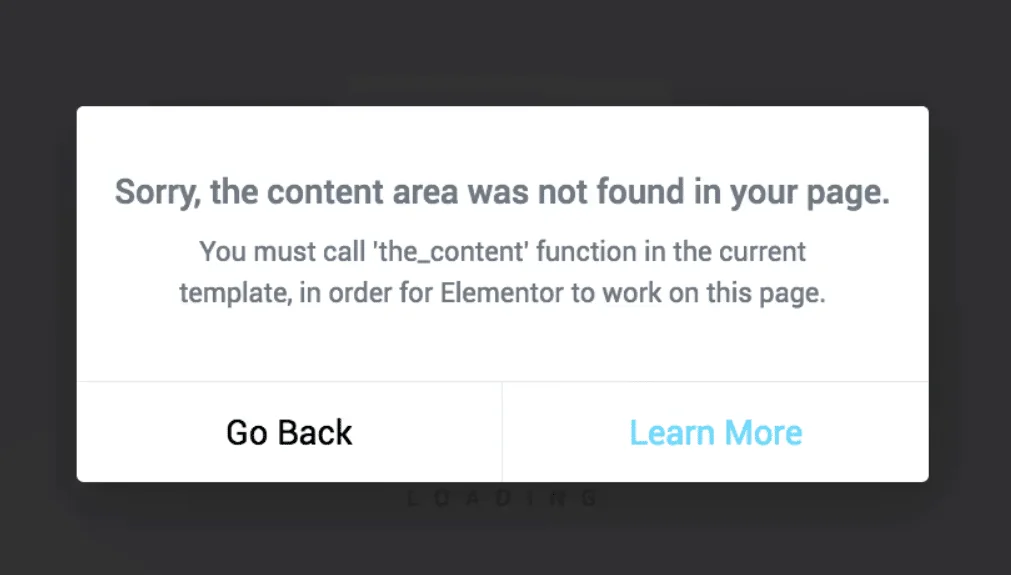
Elementor error content function?
When Elementor reported error "You must call the content function", the problem is usually in the template lack of the_content() function, this article explains the structure of the WordPress content loop and repair methods.

Recommended Collection of Free Plugins to Replace Elementor Pro (Legit and Powerful)
Want to achieve professional functionality with the free version of Elementor? This article recommends 6 powerful free plugin combinations covering forms, headers and footers, animation styles and layout modules.
Common Misconceptions and Solutions in Elementor Safe Mode
Learn about common misconceptions and solutions in Elementor security mode to help you easily troubleshoot plugin conflicts, front-end design issues, and performance impacts to optimize your WordPress site building process.

 简体中文
简体中文  English
  日本語
日本語  Français
  Español



