




With the hot rise of cross-regional sales, distributed warehousing and local delivery, e-commerce platforms have an increasing need for multi-warehouse management. For the use of WordPress combining WooCommerce For the merchants, how to realize multi-warehouse inventory management, intelligent delivery, automatic warehousing has become the key to improve logistics efficiency and user experience.
This tutorial will take you from the ground up to a comprehensive understanding of the WooCommerce Multi-Warehouse SystemThe setup process of the, and recommend practical plug-ins to help you easily build an efficient e-commerce warehousing system.
![Image [1]-WooCommerce multi-warehouse setup complete tutorial (with plugin recommendations and configuration process)](https://www.361sale.com/wp-content/uploads/2025/05/20250514101636499-image.png)
I. Why use a multi-warehouse system?
In the traditional single-warehouse e-commerce model, all orders are handled by one warehouse, which is prone to the following problems:
- Long delivery times: Customers are located farther away from the warehouse, increasing distribution costs and time.
- Inventory pressure: Centralized management leads to overloading of stock in one warehouse while demand exceeds supply in other areas.
- Unable to localize shipments: Regional marketing and campaign effectiveness is limited.
by contrast Multi-warehouse management system Can bring:
✅ Faster delivery (proximity shipments)
✅ Higher inventory turnover
✅ Flexible warehousing strategy (regionally oriented, category-specific warehousing)
✅ Better customer experience
II. Ways to achieve multi-warehouse management
WooCommerce doesn't natively support multi-warehouse functionality, but we can use it with the Professional Plug-ins to realize. Common ways include:
- Plug-in for multi-warehouse inventory allocation and display
- Intelligent selection of the nearest warehouse for shipment based on the user's address
- Inventory synchronization and early warning at the warehouse level
- and logistics API maybe ERP systema joint (between components)
![Image [2]-WooCommerce multi-warehouse setup complete tutorial (with plugin recommendations and configuration process)](https://www.361sale.com/wp-content/uploads/2025/05/20250514102639523-image.png)
Third, the recommended WooCommerce multi-warehouse plug-ins
1. WooCommerce Multi Locations Inventory Management
🔧 Feature Highlights:
- be in favor ofUnlimited Warehouseincrease
- Different warehouse inventory can be set for each product
- Automatically matches shipping warehouses to customer locations
- Warehouse inventory statistics and export function
Price: Paid access
![Image [3]-WooCommerce multi-warehouse setup complete tutorial (with plugin recommendations and configuration process)](https://www.361sale.com/wp-content/uploads/2025/05/20250514160851506-img_v3_02m9_19b8f254-37c9-4d9d-ad44-7c0758d101bg.png)
2. ATUM Inventory Management for WooCommerce(free + paid extensions)
🔧 Feature Highlights:
- Powerful Inventory Dashboard
- Multi-warehouse functionality is required with a paid plug-in (Multi-Inventory)
- be in favor ofVendor management, purchase orders, inventory tracking
Price: Free of charge for core functions, extension modules purchased separately
![Image [4]-WooCommerce multi-warehouse setup complete tutorial (with plugin recommendations and configuration process)](https://www.361sale.com/wp-content/uploads/2025/05/20250514102814138-image.png)
3. Stock Locations for WooCommerce(suitable for basic use)
🔧 Feature Highlights:
- Simple warehouse location marking
- Product levels are associated with multiple warehouses
- Front-end can display inventory warehouse information
Price: Free
![Image [5]-WooCommerce multi-warehouse setup complete tutorial (with plugin recommendations and configuration process)](https://www.361sale.com/wp-content/uploads/2025/05/20250514103021483-image.png)
IV. Installation and Configuration Process (in ATUM (Plug-in as an example)
Step 1: Install the plugin
- Purchase and download plugins (such as ATUM)
- Installing Plugins in the WordPress Backend
- Enter the settings screen after enabling the plugin
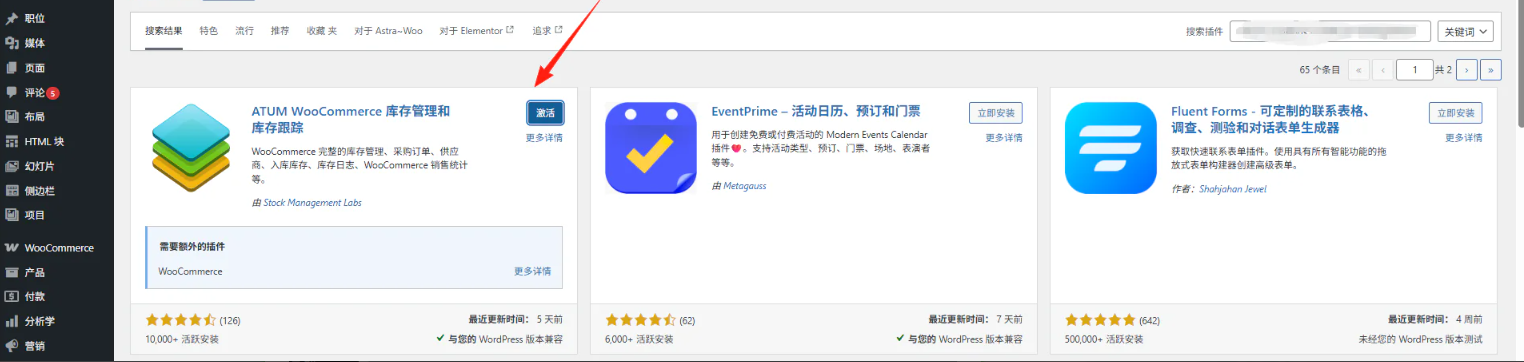
Step 2: Basic Settings
- Purchase orders
- Inventory
- provider
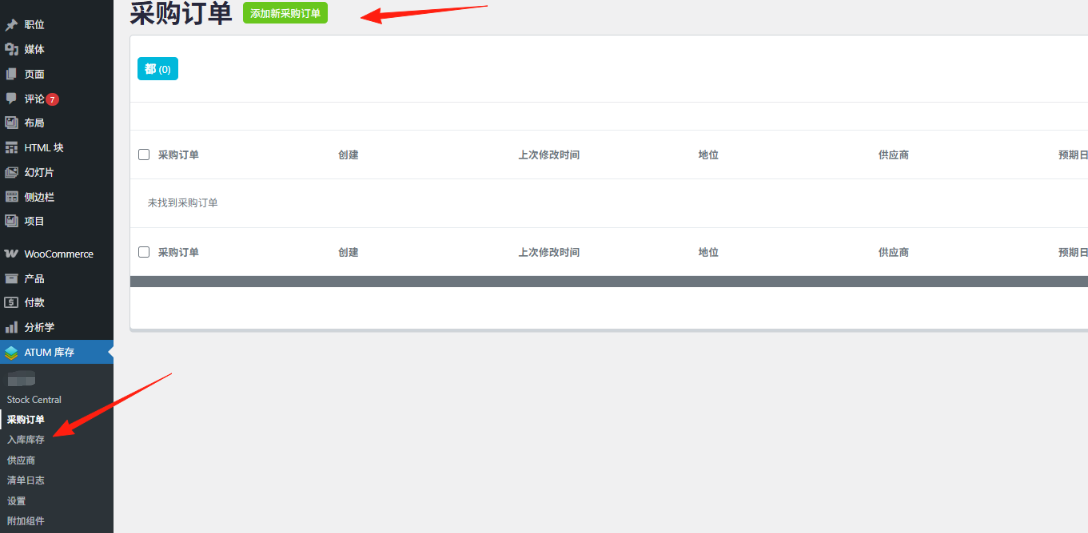
Step 3: Inventory Dashboard Display
- Configure the basic data.Procurement, inventory, supplierset al. (and other authors)
- instrument panelsdata visualizationshowcase
- Provide decision making, minimum inventory warning, etc.
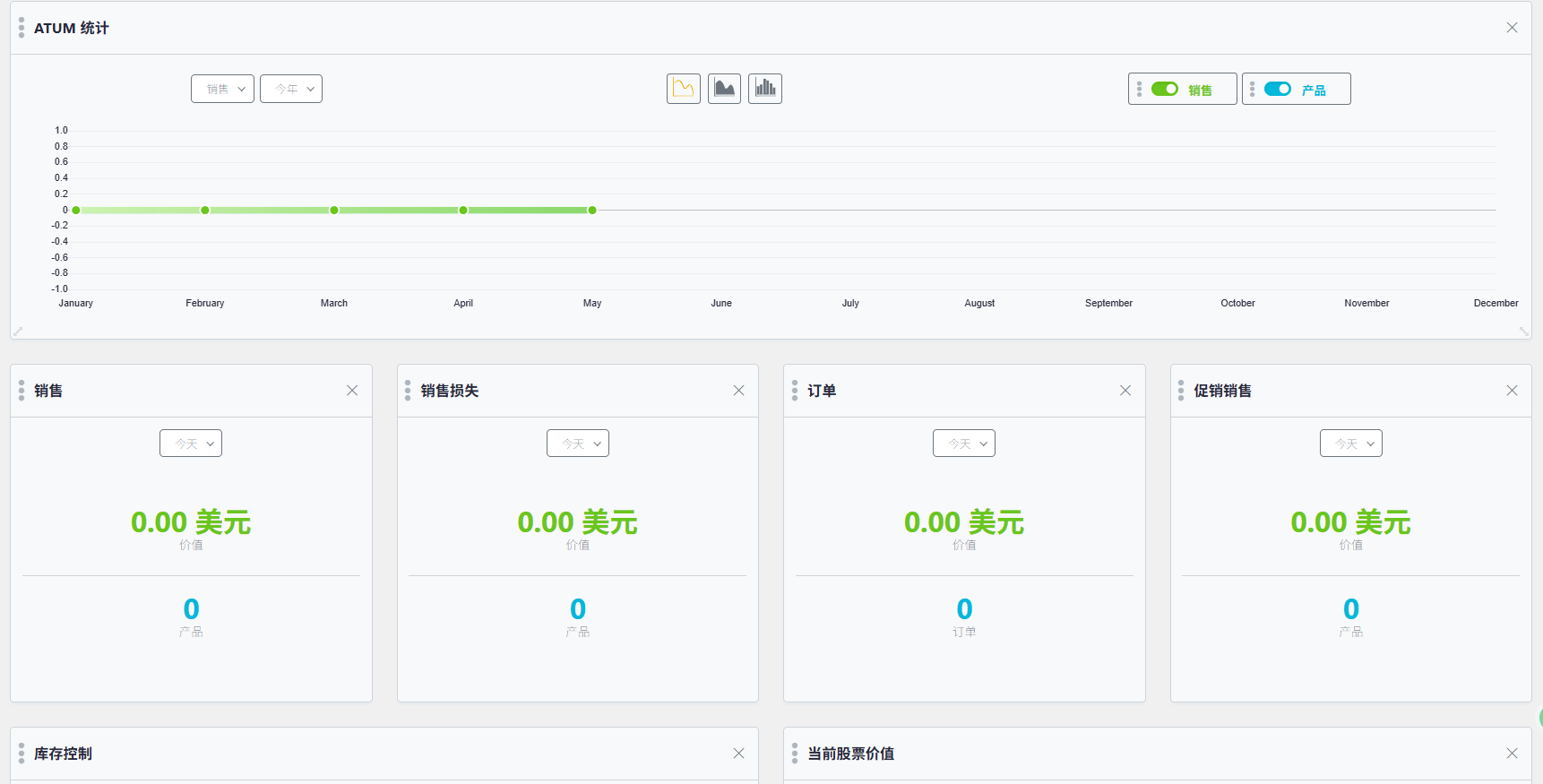
V. Frequently asked questions and recommendations
Q1: Does the plugin support multi-language and multi-currency?
Most support WPML maybe PolylangPrices and inventory can be used with Currency Switcher.
Q2: How are orders processed in separate bins?
Some plugins support splitting an order into multiple warehouse shipments (split order function).
Q3: Does the multi-warehouse system affect the checkout process?
It does not affect user operations, but the checkout page can be customized to show "Estimated Shipping Warehouse" or "Inventory Location".
VI. Summary and recommendations
Multi-warehouse management with WooCommerce allows you toOptimization of inventory structuresharplyImprove logistics efficiency and user satisfaction. It doesn't matter if you'reCross-border sellers, local life deliveryOr operate multiple warehouses. B2B Enterprises.multi-bin systemAll worth putting into use.
Recommended Combination:
- Small Business:
Stock Locations for WooCommerce(free of charge) - Growing Merchants:
ATUM + Multi-Inventory - Medium to large cross-regional merchants:
WooCommerce Multi Locations Inventory Management

Link to this article:https://www.361sale.com/en/54052The article is copyrighted and must be reproduced with attribution.














![Emoji[wozuimei]-Photonflux.com | Professional WordPress repair service, worldwide, rapid response](https://www.361sale.com/wp-content/themes/zibll/img/smilies/wozuimei.gif)

![Emoticon[baoquan] - Photon Wave Network | Professional WordPress Repair Services, Worldwide Coverage, Rapid Response](https://www.361sale.com/wp-content/themes/zibll/img/smilies/baoquan.gif)


 简体中文
简体中文  English
  日本語
日本語  Français
  Español


No comments