





Whether it's an official corporate website, a personal blog, a news portal or an online education platform, a content management system (CMS) is a core tool for content creation and distribution.Open Source CMSe.g.
In using an open source CMS for content creation and management, how can youefficiently,successive,specialized fieldground for the operation?
Why choose an open source CMS for content management?
An open source CMS has the following advantages over closed source systems or custom development:
lighter weight : Free to use, no expensive license feesHighly flexible : Support for plug-ins, module extensions and template customizationActive community : Continuous updates and contributions from developers worldwideautonomous and controllable : Data is fully attributable to the user
![Image [2]-Open Source CMS Content Management Best Practices: A Guide to Efficient Workflows from Planning to Publishing](https://www.361sale.com/wp-content/uploads/2025/06/20250604150919563-image.png)
Common open source CMS include:
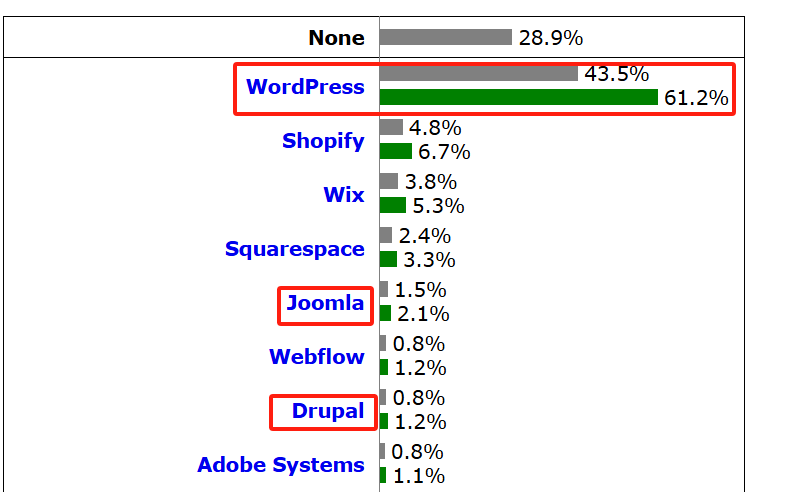
- WordPress: Highest global market share with 43.51 TP3T of websites using WordPress and 61.21 TP3T market share for its content management system.
- Drupal: Powerful for sites with complex structures and large-scale data
- Joomla!: Intermediate system for users with a certain technical background
![Image [3]-Open Source CMS Content Management Best Practices: A Guide to Efficient Workflows from Planning to Publishing](https://www.361sale.com/wp-content/uploads/2025/06/20250604151054746-image.png)
1. Content strategy and planning are fundamental
The first step in content management is not hands-on writing, but developing a clear content strategy:
target setting
- Is your website content for sales? Educate? Attract traffic? Enhance your brand?
- Clarity of objectives helps with the style and structure of subsequent content.
Developing content types
- Blog Posts
- product page
- FAQ
- Case Studies
- Video or podcast content
Build a classification structure
Good information architecture improves user experience and SEO:
- Use clearCategory and Tag
- Setting up parent-child page hierarchies for documentation and tutorial sites
- WordPress can be used with plugins such as
Custom Post Type UI Creating Custom Content Types
![Image [4]-Open Source CMS Content Management Best Practices: A Guide to Efficient Workflows from Planning to Publishing](https://www.361sale.com/wp-content/uploads/2025/06/20250604162650856-image.png)
2. Content creation: process, structure, modularization
Increase Efficiency with Visual Editors
Gutenberg (WordPress default editor): Modularized block design with support for embedded videos, galleries, buttons, etc.Classic Editor or Elementor (WordPress): Support for stronger visualizationCKEditor (Joomla, Drupal): WYSIWYG editor with support for extensions
Templates and reuse mechanisms
- Create content templates (e.g. blog post structure, case presentation pages)
- utilizationreusable block(
Reusable Blocks ) orshort code(Shortcode) to standardize the format - utilizationCustom Fields Plugin(e.g. ACF) to standardize the content input structure
![Image [5]-Open Source CMS Content Management Best Practices: A Guide to Efficient Workflows from Planning to Publishing](https://www.361sale.com/wp-content/uploads/2025/06/20250604162742902-image.png)
3. Content collaboration and role rights management
When collaborating with multiple people, it is important to have clear role delineation and permission settings:
WordPress Role Example:
- Administrator: full access
- Editing: managing content but not site settings
- Authors: can only post their own articles
- Subscribers: only view content or leave a comment
Best Practices:
- configureContent Approval ProcessIf you use a plug-in
Edit Flow maybePublishPress - Version control: WordPress comes with a revision feature that allows you to restore the historical version at any time.
- Add message comment area for communication between editors
![Image [6] - Open Source CMS Content Management Best Practices: A Guide to Efficient Workflow from Planning to Publishing](https://www.361sale.com/wp-content/uploads/2025/06/20250604163024329-image.png)
4. SEO and content optimization
High-quality content should not only be attractive, but also search engine friendly.
SEO Best Practices:
- Each article should have aSEO Title, Description and Keywords(Use plug-ins such as
Yoast SEO /Rank Math ) - rational use H1~H3 heading level, enhance the semantic structure
- increaseinternal linktogether withExternal authority citation
- Use of **structured data (
Schema Markup ) **Optimized presentation - Add ALT descriptions to images to improve accessibility and SEO
![Image [7]-Open Source CMS Content Management Best Practices: A Guide to Efficient Workflows from Planning to Publishing](https://www.361sale.com/wp-content/uploads/2025/06/20250607103726689-image.png)
5. Content updates and lifecycle management
Content isn't something you post and leave alone; the following strategies can increase the long-term value of your content:
Regularly updated content
- Periodic review of content for obsolescence (especially technical or news content)
- Add "Last Updated" timestamps to old articles
- Updated data, charts, external links and other information
Content reorganization and repurposing (Content Repurposing)
- Breaking down long articles into multiple short social media posts
- Turn a graphic into a video or podcast
- Merging multiple old content into a new thematic collection
![Image [8]-Open Source CMS Content Management Best Practices: A Guide to Efficient Workflows from Planning to Publishing](https://www.361sale.com/wp-content/uploads/2025/06/20250604165335121-image.png)
Security and Privilege Management
The management of content must be based on security:
Safety Recommendations:
- Regularly backup website content (recommended plugins: UpdraftPlus, BackupBuddy)
- Control back-end user permissions to avoid granting too many permissions to non-administrators
- Enable login security protections (e.g., double authentication, limit login attempts)
- Installation of security plug-ins (e.g. Wordfence,iThemes Security)
6. Enhance the content management experience with plug-ins and extensions
Recommendations for commonly used plugins (WordPress as an example):
| Plug-in Name | functionality |
|---|---|
| Yoast SEO / Rank Math | SEO optimization, structured data, meta-information editing |
| ACF | Create custom fields to structure content |
| Edit Flow / PublishPress | Content Approval Process and Teamwork |
| WPML / Polylang | Multilingual Content Management |
| UpdraftPlus | Automatic content and database backup |
For Drupal and Joomla, there is module support for similar functionality.
Conclusion: Content is the life of a website, CMS is the brain!
When you choose an open source CMS, you have a flexible and powerful platform for content manipulation. You also need to incorporate a systematic content strategy and best practices to really leverage its power.
- Developing a content strategy
- Build a good information architecture
- Processed content creation and review
- Enhanced security and privilege management
- Continuously optimizing and updating content

Link to this article:https://www.361sale.com/en/57218The article is copyrighted and must be reproduced with attribution.



















![Emoji[wozuimei]-Photonflux.com | Professional WordPress repair service, worldwide, rapid response](https://www.361sale.com/wp-content/themes/zibll/img/smilies/wozuimei.gif)

![Emoticon[baoquan] - Photon Wave Network | Professional WordPress Repair Services, Worldwide Coverage, Rapid Response](https://www.361sale.com/wp-content/themes/zibll/img/smilies/baoquan.gif)


 简体中文
简体中文  English
  日本語
日本語  Français
  Español


No comments