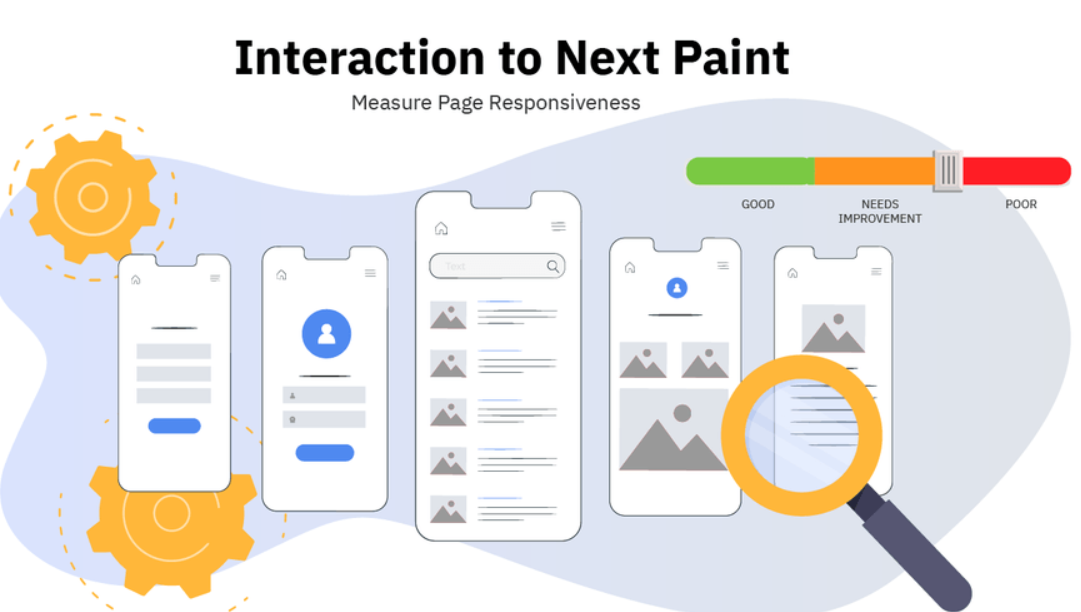





in using WoodMart build (esp. with simple materials) WooCommerce E-commerce website At this time, many webmasters will find that:Page load speed is not slow, but the INP metric remains persistently high.Especially in Homepage, Category Pages, and Product PagesINP often exceeds 400ms or even 700msdirectly affects Core Web Vitals Scoreand SEO performanceThe
This paper will closely focus on WoodMart INP is elevated This core issue, from Theme Structure and Front-End Interaction Mechanisms Get started, analyze the real causes, and provide a set of Directly implementable optimization solutionsHelp sites effectively reduce INP.
1. Understanding What INP Is and Why WoodMart Sites Must Prioritize Optimization
1.1 Definition of INP (Interaction to Next Paint)
INP measures the time between a user's interaction (click, touch, input) on a page and the next visible update on that page.
It can be simply understood as:After a user clicks on a page, how long does it take for the page to actually "respond"?The
Unlike FID, which previously focused solely on the first interaction, INP measures interactions throughout the page lifecycle.The slowest interactionTherefore, it is stricter and more closely aligned with the actual user experience.
1.2 Google's INP Scoring Criteria
| INP Value Range | User Experience Level | Official recommendations |
|---|---|---|
| ≤ 200ms | favorable | No optimization required |
| 200ms – 500ms | Need for improvement | Recommend optimizing interactive performance |
| > 500ms | mediocre | Significantly impacts user experience and SEO |
![Image[1] - Freezes with a single click? Real-world testing reveals the true cause behind WoodMart's high INP](https://www.361sale.com/wp-content/uploads/2025/12/20251222183249405-image.png)
Without specialized optimization,WoodMart site INP Typically concentrated in the 400–1000ms rangeThe
1.3 A Common Misconception
It is particularly important to emphasize that:INP is not synonymous with slow page loading, nor is it directly determined by server response time.
Even if AJAX requests are fast, INP will remain high as long as there is significant JavaScript execution, DOM manipulation, or synchronous computation occurring after user interaction.
II. Overview of the Fundamental Causes of Elevated WoodMart INP
Based on numerous real-world cases,WoodMart INP issues are typically not caused by a single factor, but rather result from the combination of the following types of problems:
- JavaScript main thread is overloaded
- Interaction event handling logic is complex
- DOM structure is deep and contains numerous nodes
![Image[2] - Freezes with a Single Click? Real-World Testing Reveals the True Cause Behind WoodMart INP's Elevated Readings](https://www.361sale.com/wp-content/uploads/2025/12/20251223092937501-image.png)
- Third-party plugins are listening to too many events.
- Mobile performance bottlenecks are amplified.
| Page Type | Common INP Range | The main reason |
|---|---|---|
| fig. beginning | 500–900 milliseconds | JS is numerous, modules are complex, and DOM is large in size. |
| category page | 600–1000 milliseconds | AJAX Filtering and Product List Redrawing |
| product page | 400–700 milliseconds | Variant switching, Add to Cart interaction |
| Mobile Page | Higher than desktop | Weak CPU performance, slow JavaScript execution |
The following will break down the high-frequency page types with elevated INP values on the WoodMart e-commerce site.
III. Primary Cause: Severe Blockage of the JavaScript Main Thread
3.1 Structural Features of WoodMart's JavaScript
WoodMart is a highly integrated theme that loads numerous interaction-related scripts on the frontend, such as:
- Core Theme Interaction Logic
- AJAX Add to Cart
- Mini Cart Update
- Header / Sticky / Mega Menu Behavior
- Animations and transitions
Most of these scripts run on the browser's main thread. If they take too long to execute, they block user interaction events, directly increasing INP.
3.2 Solution: Defer non-critical JavaScript execution (mandatory)
Step 1: Enable the Delayed JS Feature
You can use any of the following performance plugins:
- WP Rocket
![Image[3] - Freezes with a Single Click? Real-World Testing Reveals the True Cause Behind WoodMart INP's Elevated Readiness Index](https://www.361sale.com/wp-content/uploads/2025/12/20251222183745771-image.png)
- FlyingPress
- Perfmatters
start using Delay JavaScript Execution Function.
Step 2: Delay Object Selection Principle
The delayed target should be set to Theme Interaction Enhancement Script for the sake of, rather than WooCommerce Core Interaction Script.
Caveats:
Add to CartBelongs to the WooCommerce core scripts,It is not recommended to add directly to the delay list.- Error delays in core scripts may cause unresponsive first clicks, thereby increasing INP.
The correct approach is:Reduce the amount of JavaScript execution during interactions, rather than simply "delaying everything."
IV. Secondary Cause: Overly Heavy Interaction Event Handler
4.1 What Is "Slow Interaction"?
When a user clicks a button, if the event handler contains:
- Multiple DOM queries
- Forced reflow
- Synchronous computation
- Multi-module synchronized update
This interaction will then occupy the main thread for an extended period, becoming the "slowest interaction" in terms of INP.
4.2 The Most Common Slow Interaction Scenarios in WoodMart
4.2.1 AJAX Add to Cart
Adding an item to the cart typically triggers:
- AJAX request
- Product Status Update
- Mini Cart Redesign
- Header Count Refresh
- animation effect
These operations are completed in a single click and can easily become a major source of INP.
![Image[4] - Freezes with a Single Click? Real-World Testing Reveals the True Cause Behind WoodMart's High INP](https://www.361sale.com/wp-content/uploads/2025/12/20251222184044461-image.png)
4.3 Solution: Simplify the Interaction Chain
Practical Tip 1: Disable Non-Essential Animations
Disable in Theme Settings:
- Fly to cart animation
- High Frame Rate Add to Cart Animation
Reduce the amount of JavaScript execution triggered by a single click.
Practical Exercise 2: Optimizing the Mini Cart More Safely
For the Mini Cart update, the recommended approach is:
- Enable the cache plugin provided Cart Fragments Optimization Plan
- Reduce DOM repaints when triggered
Note: It is not recommended to disable this feature directly without thorough testing. wc-cart-fragmentsOtherwise, it may cause the shopping cart status to become out of sync.
V. Root Causes: Complex DOM structure, excessive HTML volume
5.1 The Current State of WoodMart Page Structure
In real-world projects, a typical WoodMart page often features:
- 3,000–6,000 DOM nodes
- Multi-level Nested Headers and Mega Menus
- Builder module nested repeatedly
The more complex the DOM structure, the higher the cost of JavaScript operations and page repaints, naturally leading to slower interaction responsiveness.
5.2 Solution: Streamline Page Structure
Practical Exercise 1: Optimizing Headers and Menus
- Reduce the number of modules in the header
- Reduce the hierarchical depth of the Mega Menu
- Avoid placing complex HTML blocks in the header.
Practical Exercise 2: Streamlining Builder Content
- Homepage: Avoid loading all modules at once
- Use Tabs / Accordions to collapse non-first-screen content
- Merge duplicate product display modules
Reasons for Level 6 and Level 4: Interference with interactions caused by third-party plugins.
6.1 High-Risk Plugin Types
The following plugin types often significantly increase INP:
- Marketing Pop-up Plugin
![Image[5] - Freezes with a Single Click? Real-World Testing Reveals the True Cause Behind WoodMart's High INP](https://www.361sale.com/wp-content/uploads/2025/12/20251222184141512-image.png)
- Real-time Statistics / Heatmap
- Instant messaging tool
- Page Interaction Enhancement Plugin
These plugins typically monitor a large number of user events, consuming resources on the main thread.
6.2 Solution: On-Demand Loading of Plugin Resources
utilization Perfmatters or Asset CleanUp:
- Load plugin JS based on page type
- Prohibit unnecessary site-wide script loading
VII. Root Cause: Amplified Mobile Performance Bottlenecks
7.1 Why Mobile INP is Higher
- CPU performance is relatively weak
- JavaScript execution time is longer
- WoodMart mobile version still loads a significant amount of interactive logic.
7.2 Mobile-Specific Optimization Recommendations
- Avoid relying on hover logic
- Unify the interaction method to a clear click
- Disable parallax and complex animation effects
8. INP Optimization Checklist (Ready to Implement)
Required items
- Defer WoodMart non-critical JavaScript
- Disable unused theme features
- Simplify the Add to Cart Interaction
- Streamline Header and Menu Structure
Advanced Items
- Conditional Loading Plugin JS
- Streamline the DOM structure
- Split the Builder Module
- Test and optimize mobile devices separately
IX. Actual Expected Outcomes Following Optimization
After proper configuration, most WoodMart sites can achieve:
| web page | pre-optimization | post-optimization |
|---|---|---|
| Home INP | 600–900 milliseconds | 150–250 milliseconds |
| Category Page INP | 700 milliseconds | 200–300 milliseconds |
| Product Page INP | 500 milliseconds | 150–250 milliseconds |

Link to this article:https://www.361sale.com/en/84005The article is copyrighted and must be reproduced with attribution.


















![Emoji[wozuimei]-Photonflux.com | Professional WordPress repair service, worldwide, rapid response](https://www.361sale.com/wp-content/themes/zibll/img/smilies/wozuimei.gif)

![Emoticon[baoquan] - Photon Wave Network | Professional WordPress Repair Services, Worldwide Coverage, Rapid Response](https://www.361sale.com/wp-content/themes/zibll/img/smilies/baoquan.gif)


 简体中文
简体中文  English
  日本語
日本語  Français
  Español


No comments