




WP self-taught website builder Page 13
At Photon Academy, we specialize in providing high quality WordPress instruction to help you master every aspect of WordPress from basic to advanced. Our courses are designed to allow students to get hands-on and understand the power of WordPress, whether it's building a personal blog or a business website.
arrange in order

How do I customize the colors of my WordPress website?
What are WordPress themes? Can I change the theme colors? WordPress themes control the appearance of a website and the visual experience users have while using it. A typical WordPress theme is a set of pre-designed templates that can be installed on a website to change its...
How to Add Title Attribute to WordPress Navigation Menu
In website design, the navigation menu is one of the main ways for users to interact with the website. To enhance the user experience, we can provide users with more background information about the menu items by adding a title attribute to the WordPress navigation menu. This not only helps users to better ge...

How to install and setup WP Super Cache for newbies?
A website that can be accessed quickly allows for an enhanced customer experience. It also facilitates SEO and improves the ranking of the website, Google search engine now makes the website speed as an important ranking factor. WP Super Cache is a popular plugin that...
How to Create a WordPress Child Theme (Beginner's Guide)
Child themes are WordPress themes that inherit functionality from other WordPress themes. Many administrators create child themes for their current theme so they can safely customize their site design without losing pre-update settings when the theme is updated. How do child themes work? To ...
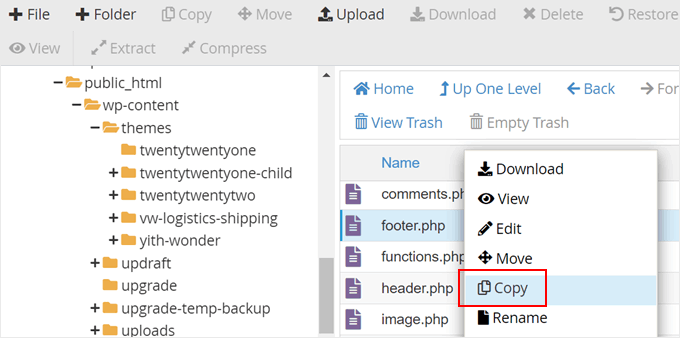
How to Edit and Optimize WordPress Child Theme Template Files and Features (Detailed Tutorial)
Our tutorial in this installment is still about child themes. We talked earlier about how to create a child theme. Now, let's see how to edit the template files of a child theme, how to add new features to a child theme and how to fix some WordPress child theme issues. How to edit a child theme's...

How do I change the sidebar in WordPress?
When to Change the Default Sidebar in WordPress A sidebar is a column on a WordPress website, usually located to the left or right of the main content area. In classic WordPress themes, this sidebar is essentially a widget area in which wor...

How to Improve Website Content Organization and SEO with WordPress Taxonomy
WordPress taxonomy is an important feature for organizing and managing website content, it helps webmasters to group and categorize posts to provide readers with a better navigational experience, and also helps search engines to better understand the content of the website, thus optimizing SEO results. In this detailed ...
How to Configure Google Search Console to a WordPress Website: A Detailed Guide
What is Google Search Console? Google Search Console (GSC) is a free tool provided by Google that allows website owners to monitor and manage their website's performance in Google search results.GSC is a key tool for improving your website's search visibility. It...

How to Send WordPress Emails with Free SMTP Server
I don't know if you guys have noticed that the default PHP email feature of WordPress doesn't work well. It often sends important emails directly to the spam folder, or even not at all. We ourselves use an SMTP server to make sure we get our emails every time. But...
How to Fix WordPress Not Sending Emails Issue
I don't know if you have encountered WordPress website can't send email, contact form submission disappeared, important notification email did not deliver and so on. In fact, the problem does not lie in WordPress, but in the way the website sends emails. Let's see what are the...

How to Paste a Code Snippet from a Web Page into WordPress for Newbies
Hello everyone! Today's tutorial focuses on teaching you how to safely paste various custom code snippets into WordPress. Below is mainly to share some of our team's experience in pasting custom code snippets. The best way to add code snippets to WordPress is...
How to Quickly Fix Invalid JSON Response Errors in WordPress
Before we get into what causes the Invalid JSON Response error in WordPress, let's first understand what triggers this error. The error message usually pops up when you're working in the WordPress block editor, and when you try to add media files directly to the block...
How to bind multiple domains on a WordPress site with a plugin?
Creating a site with WordPress is very easy and WordPress supports binding one domain name by default. If you have more than one domain name and want to point them to the same WordPress site, you can do it by using a domain mapping plugin. Not only that, but these plugins also support the use of domains that are not...
How to Optimize admin-ajax.php in WordPress: Reduce Performance Issues Caused by High Usage
The file admin-ajax.php plays a key role in WordPress websites, it is the core file that manages AJAX requests and allows you to implement dynamic features such as real-time notifications, asynchronous form submissions, infinite scrolling, and more without having to refresh the entire page. When admin-ajax.p...
How to set the maximum number of products per user in WooCommerce?
When running a WooCommerce e-commerce platform, limiting the maximum number of products that can be purchased by each user is a very useful feature, especially when you need to sell limited edition products or manage inventory. With this feature, you can ensure a fairer distribution of products and avoid a few users...
The Complete Beginner's Guide to Troubleshooting WordPress Errors
This article details how to troubleshoot and fix common WordPress errors, including white screen of death, database connection errors, plugin and theme conflicts, and more. With this guide, you can quickly resolve issues, ensure your website runs smoothly and improve user experience.
How to Fix WordPress Admin Ajax 400 (Bad Request) Error
Learn how to fix Admin Ajax 400 (Bad Request) error in WordPress. This article will cover the common causes of this error, such as invalid URLs, browser caching, plugin conflicts, etc., and provide solutions that will help you get your site back to functionality quickly.
How to Increase WordPress Maximum Upload File Size: The Complete Guide
Learn how to check and increase the maximum upload file size limit for WordPress. This article explains in detail how to modify the .htaccess file, functions.php file, php.ini file, as well as the use of plug-ins or multi-site settings to increase the upload size of a variety of methods, suitable for different technical ...

How to Enforce Strong Passwords in WordPress, Configure Security Policies and Secure Your Website
Learn how to enforce strong passwords in your WordPress site, configure password policies through plugins, customize forms and enable application passwords to improve overall site security and prevent security risks caused by weak passwords.
How to Repair Broken CSS in WordPress Admin Panel
WordPress Backend CSS Corruption, WordPress Styling Issues, CSS Styling Fixes, Plugin Conflict Fixes, HTTPS Mixed Content, WordPress Theme Conflicts, CDN Caching Issues, File Permission Errors, Browser Extension Interference, WordPress Troubleshooting

How to Create and Add Rules in WordPress Robots.txt File
Learn how to create, edit, and optimize your WordPress website's robots.txt file with rule descriptions, plugin usage, common mistakes to avoid, and validation tips to help you improve SEO performance and protect your website's privacy.

How to Create Custom Gutenberg CTA Blocks in WordPress Using Advanced Custom Fields (ACF)
Learn how to create custom call-to-action (CTA) blocks in the Gutenberg editor with the ACF plugin to boost website interactivity and entice users to click. The detailed tutorial covers all the steps from registering the block to styling it.
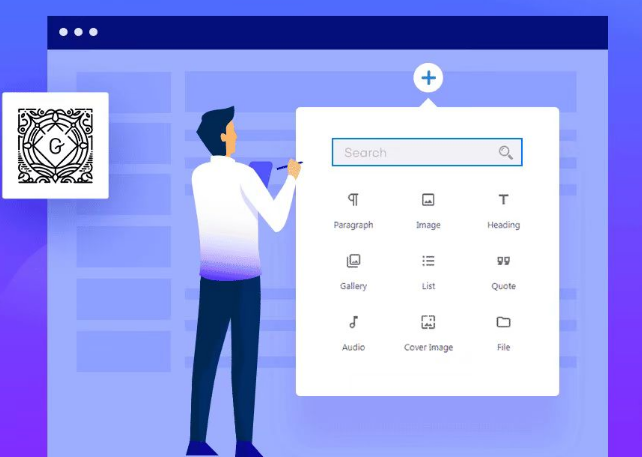
Common Gutenberg Editor Block Types and Their Functions Explained
Explore how to add and use blocks in the Gutenberg editor, learn about common block types, and learn tips for customizing and extending the Gutenberg editor to improve flexibility in WordPress content creation and page layout.

How to Add Parallax Effects to Your WordPress Website: From Manual Coding to Using Elementor
A comprehensive breakdown of how to add parallax effects to your WordPress website, including detailed methods for manual coding, using plugins and Elementor, to help you create dynamic and attractive web designs with ease.

What is the difference between 502 and 504 gateway errors and solutions
Understand the difference between 502 and 504 gateway errors and their common causes, and learn how to troubleshoot and resolve these issues to optimize server performance and improve website reliability.

How AWS, Google Cloud, and Azure respond to 502 and 504 errors and their automatic fixes
Learn how AWS, Google Cloud, and Azure handle 502 and 504 errors, and explore their auto-healing and fault-tolerance mechanisms, including key technologies such as health checking, auto-scaling, and load balancing, to ensure high system availability and stability.
Fix "ERR_TOO_MANY_REDIRECTS" error in Chrome
Experiencing "ERR_TOO_MANY_REDIRECTS" error in Chrome? This article provides solutions including clearing cache, disabling extensions, checking server settings, etc. to help you fix browser redirection issues quickly.

Elementor AI: How to use AI to modify CSS and code to beautify your login page
Enhance your login page design with Elementor AI modifications to CSS and code to optimize page load speed, enhance interactivity, save development time and improve user experience. This article details how to customize buttons, backgrounds, fonts, and animations with AI to create engaging...
Detailed Tutorial on Optimizing WordPress CRM with FluentCRM
FluentCRM is a powerful WordPress CRM plugin that supports customer management, email marketing and automated marketing processes. This article describes in detail the installation, configuration, customer categorization and marketing automation of FluentCRM to improve the marketing efficiency and customer interaction rate of your business.

Astra Theme with GTranslate Plugin Multilingual Website Builder Tutorial
Learn how to implement multi-language support in an Astra theme WordPress website using the GTranslate plugin. This article describes key features such as plugin installation, setup, SEO optimization features, automatic language switching, and custom button styling to help websites improve their global access experience.

 简体中文
简体中文  English
  日本語
日本語  Français
  Español



