




When using Cloudflare CDN,Cloudflare 1016 (Origin DNS error) Often mistaken for server or node issues, as the common symptom is:Some users can access it, while others encounter errors directly.In essence, 1016 is fundamentally DNS resolution phase failedWhether it affects the entire site depends on whether Cloudflare obtains consistent resolution results across different access environments. This article will address this core issue by combining principles with practical implementation, covering trigger scenarios, assessment methods, and resolution approaches to help youQuickly determine whether 1016 is a site-wide outage or only affects some visitors.The
![Image [1] - Why does it work on computers but not on phones? The hidden reason behind Cloudflare 1016](https://www.361sale.com/wp-content/uploads/2025/12/20251218160423961-image.png)
1. What exactly is the Cloudflare 1016 error?
1. Official Definition vs. True Meaning
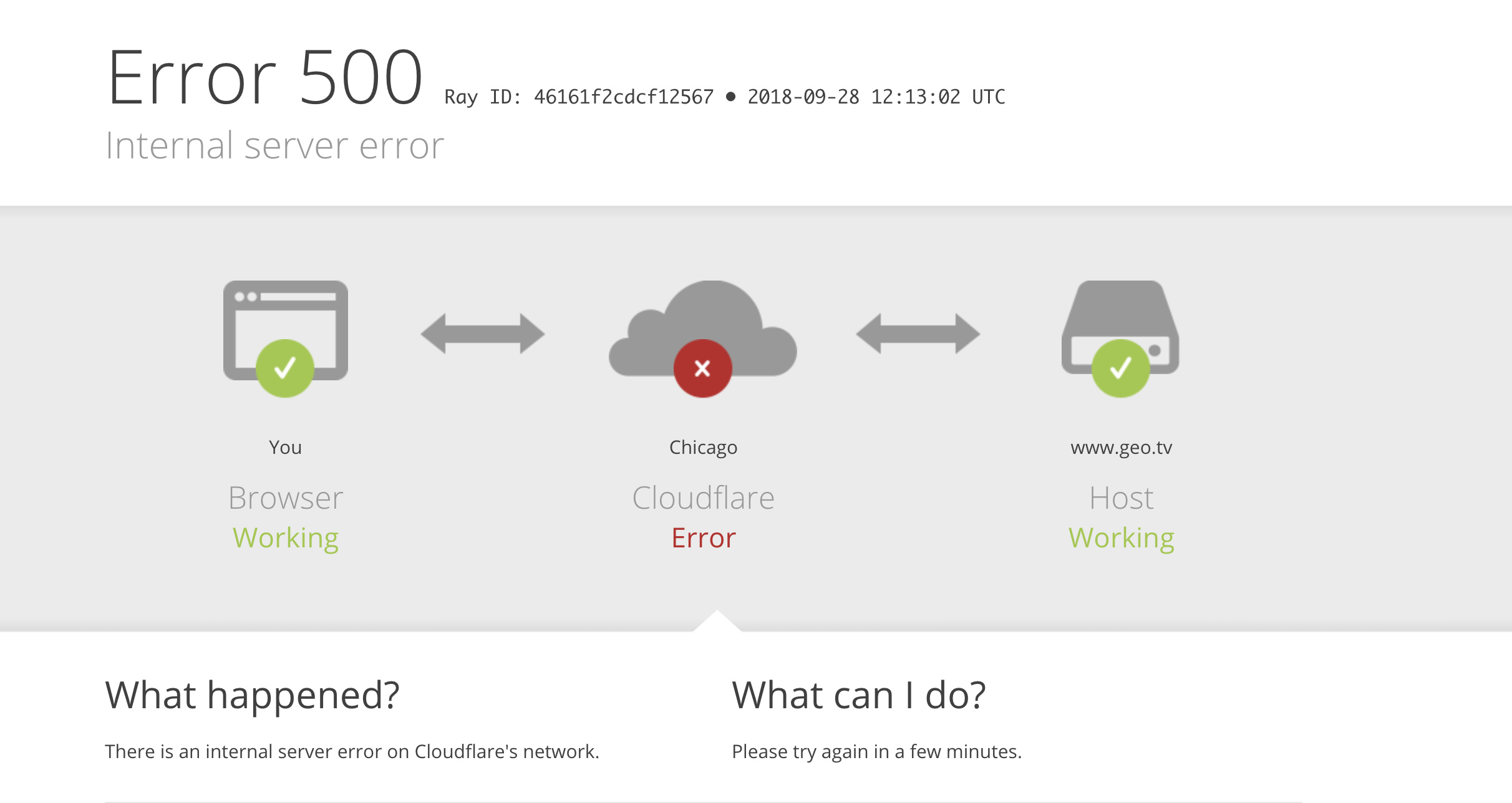
Cloudflare's official definition of 1016Yes:Origin DNS error(Source Domain System Error)
In layman's terms, it means:
There is one crucial premise that must be made clear:
Cloudflare 1016 is an error that occurs during the DNS resolution phase, not during the server connection phase.
In other words, when 1016 occurs, Cloudflare hasn't even attempted to connect to your server.
![Image[2] - Why does it work on computers but not on phones? The hidden reason behind Cloudflare 1016](https://www.361sale.com/wp-content/uploads/2025/12/20251218155137620-image.png)
2. What situations trigger Cloudflare 1016?
In actual use, any of the following conditions may trigger error 1016:
- The origin domain cannot be resolved from Cloudflare's perspective.
- DNS resolutionNo results found
- DNS resolution results point to a private IP (such as
10.x.x.x,192.168.x.x) - The CNAME record points to a domain name that does not exist or cannot be resolved.
It is particularly important to emphasize that:
"Unable to resolve" indicates that Cloudflare cannot obtain a valid public DNS resolution result, but this does not necessarily mean resolution is impossible in all network environments.
![Image [3] - Why does it work on computers but not on phones? The hidden reason behind Cloudflare 1016](https://www.361sale.com/wp-content/uploads/2025/12/20251218155606270-image.png)
3. What situations do not cause 1016?
The following questions
- Server downtime (assuming the DNS configuration itself is correct)
- Firewall connection blocked
- Port is not open.
- Network latency or packet loss
These issues typically correspond to 521, 522, or 523 errorInstead of 1016Feeling a bit dizzy? Go check it out.1016, 521, 522, 523—Who knew these errors were so different?
| take | Is it possible to trigger 1016? | instructions |
|---|---|---|
| A / AAAA points to private IP | ✅ Meeting | Cloudflare cannot access the internal network. |
| CNAME points to an unresolved domain name | ✅ Meeting | Unable to complete final resolution |
| Server downtime (DNS functioning normally) | ❌ No | Belongs to connection phase error |
| Firewall Blocking | ❌ No | Corresponding to 521/522 |
| Port is not open. | ❌ No | Non-DNS-phase issues |
II. Will Cloudflare 1016 affect the entire website?
1. First, present the conclusion.
Cloudflare 1016 It may affect the entire site or only some visitors.
The determining factor does not lie in the server status, but rather in a core issue:
| judgment dimension (math.) | Entire Site 1016 | Partial Visitors 1016 |
|---|---|---|
| Access from different regions | All failed | Partial failure |
| IPv4 / IPv6 | Simultaneous failure | Mostly IPv6 failures |
| DNS Configuration | Overall error | AAAA / Cache Issues |
| span | Persist | Typically periodic |
| Primary Areas of Investigation | DNS configuration itself | IPv6 / Time-to-Live |
2. Under what circumstances would it affect the entire site?
Scenario 1: Entire DNS configuration error on the origin server
If the following issues exist in Cloudflare DNS:
- An incorrect or non-existent IP address was entered.
- Used the internal IP address as the origin server address.
- Incorrect spelling of the origin server domain name
- The CNAME record points to a domain name that has no A or AAAA records.
So the result is usually:
- All Cloudflare edge nodes are unable to resolve the origin server.
- Regardless of which region visitors come from or which network they use
- The entire site will return a Cloudflare 1016 error.
Scenario 2: The CNAME record itself is invalid.
Example:
example.com → CNAME → origin.example.netbut origin.example.net There are no A or AAAA records.
In this scenario, Cloudflare is unable to complete the final resolution, causing the request to fail directly at the DNS stage. The entire site uniformly returns a 1016 error.
3. Typical Characteristics of the Entire Site 1016
- Access results are identical across local, overseas, and different devices.
- Abnormal configurations can be directly identified in the Cloudflare DNS panel.
- With Cloudflare proxy (Orange Cloud) enabledAll access requests exhibit consistent behavior.
Something to keep in mind:
- Cloudflare 1016 only appears when Orange Cloud is enabled.
- In the gray cloud (DNS-only) state, requests do not pass through Cloudflare and therefore do not encounter the 1016 page.
III. Why does Cloudflare 1016 sometimes only affect some visitors?
This is the most common scenario and also the one most prone to misjudgment.
1. Cloudflare is a distributed DNS and edge computing system.
Cloudflare has deployed a large number of edge nodes globally, and different visitors may:
- Hit different Cloudflare Points of Presence
- Using different network protocols (IPv4 or IPv6)
- Retrieve DNS cache results at different points in time
As long as DNS resolution varies across different environments, situations where "some users can access while others cannot" may occur.
![Image [4] - Why does it work on computers but not on phones? The hidden reason behind Cloudflare 1016](https://www.361sale.com/wp-content/uploads/2025/12/20251218155731425-image.png)
2. Most common cause: IPv6 (AAAA record) configuration anomaly
typical scenario
- Both A records and AAAA records exist simultaneously in Cloudflare DNS.
- However, the origin server's IPv6 address is unavailable, misconfigured, or the HTTP(S) service is not listening correctly.
| IPv6 Scenarios | show off | Recommended Course of Action |
|---|---|---|
| The origin server does not support IPv6. | IPv6 Users 1016 | Delete the AAAA record |
| IPv6 firewall not permitted | HTTPS failed | Release 443 |
| IPv6 points to the old server | Some nodes are abnormal | Update AAAA |
| IPv6 service is incomplete | Intermittent 1016 | Complete deployment or removal |
Actual visit results
- IPv4 users → Use A record → Access normally
- IPv6 users → Use AAAA records → Cloudflare 1016
Common manifestations
- Broadband access is available, but mobile data cannot be opened.
- Domestic users are experiencing normal service, while overseas users are encountering issues.
- At the same time, different users reported completely different results.
It should be noted that IPv6 issues stem not only from "complete lack of IPv6 support," but also include:
- IPv6 firewall not permitted
- IPv6 only supports ICMP and does not support HTTP/HTTPS.
- The IPv6 address points to the old server.
- Incomplete IPv6 port configuration
3. DNS Cache and Propagation Delay
After the following operations:
- Change the origin server IP
- Modify A / AAAA records
- Adjust the CNAME record to point to
Before the DNS TTL has fully taken effect:
- Some Cloudflare edge nodes may still be using outdated resolution results.
- This may only affect some visitors for a short period of time.
Even with a low TTL setting, Cloudflare's own edge caching may cause temporary inconsistencies.
IV. How to determine whether 1016 is a site-wide issue or affects only some visitors?
1. Multi-environment Access Testing
It is recommended to test at least the following environments:
- Local Broadband
- Mobile data
- Overseas Online Testing Tool
- Cloud server or VPS
The method for determining this is very simple:
- All environments failed → Site-wide DNS issue
- Only partial environment failure → IPv6 or DNS propagation issues
2. DNS Verification Method
Check IPv4 resolution:
dig A example.comCheck IPv6 resolution:
dig AAAA example.comKey Focus:
- Are there any unnecessary or abnormal AAAA records?
- Is the resolved result a valid public IP address?
It should be specifically noted that:ping (computing) maybe ping6 Only network connectivity can be tested.Cannot be used to determine Cloudflare 1016The
V. Practical Solutions for Different Situations
1. Solution Approach for Site-Wide 1016
- Check the A/CNAME configuration in Cloudflare DNS
- Ensure the origin server IP is a valid public IP address.
- Ensure the origin domain can be properly resolved by Cloudflare.
- Avoid pointing CNAME records to unresolved or invalid domain names.
2. Solution Approach Affecting Only Some Visitors
The recommended troubleshooting sequence is:
- Check for any erroneous or redundant AAAA records.
- Verify whether the origin server truly supports IPv6 (including HTTP/HTTPS)
- Verify whether DNS changes have not yet fully propagated.
- Clean up historical misconfigurations
If the origin server does not support IPv6,The safest approach is to delete the AAAA record directly.The

Link to this article:https://www.361sale.com/en/83372The article is copyrighted and must be reproduced with attribution.














![Emoji[wozuimei]-Photonflux.com | Professional WordPress repair service, worldwide, rapid response](https://www.361sale.com/wp-content/themes/zibll/img/smilies/wozuimei.gif)

![Emoticon[baoquan] - Photon Wave Network | Professional WordPress Repair Services, Worldwide Coverage, Rapid Response](https://www.361sale.com/wp-content/themes/zibll/img/smilies/baoquan.gif)


 简体中文
简体中文  English
  日本語
日本語  Français
  Español


No comments