




WP self-taught website builder Page 42
At Photon Academy, we specialize in providing high quality WordPress instruction to help you master every aspect of WordPress from basic to advanced. Our courses are designed to allow students to get hands-on and understand the power of WordPress, whether it's building a personal blog or a business website.
arrange in order
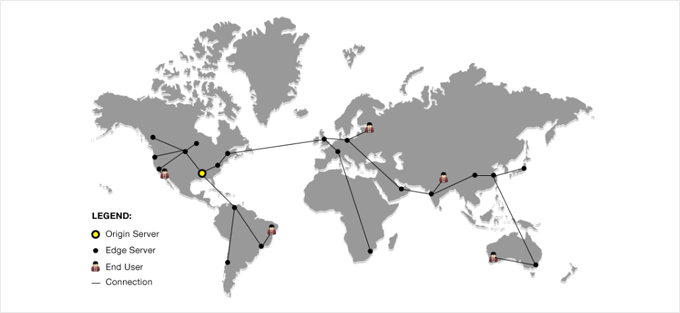
How to set up Cloudflare free CDN in WordPress
We all know that using a CDN service can increase the speed of our website.Cloudflare is one of the best WordPress CDN service in the market. And it offers free CDN service with strong security features for small business websites. Including some of our own websites are using...

WordPress Tutorial: Easy Steps to Add Video to Your Website
You can add videos to your WordPress pages or posts in several ways. You can embed videos from a video hosting service, such as AliCloud or YouTube, or you can upload videos directly from your server. Each method has its own benefits, which we'll detail in this guide...

How to Improve Website Security with WordPress Activity Logs
You can add activity logging functionality to your WordPress site by installing a plugin and can easily manage various settings from the dashboard. Fortunately, this approach is very affordable. Especially for WP Action Log, which is one of the most popular options on the market...

WordPress Guide: Steps to Setting Up a Multi-User Admin Site
WordPress developers and webmasters can use user roles to set detailed permissions for each person to operate in a WordPress site, such as setting role A to publish only specific kinds of products, role B to publish another kind of product, and role C to publish blog posts exclusively.Wor...

How to Properly Configure WordPress Email Settings
Properly configuring your WordPress website's email settings is important to stay in touch with your users. If the settings are not correct, emails may not be sent successfully. This can damage a website's reputation and user experience. Why WordPress email settings don't work...
WordPress Slug: Definition, Importance and its Impact on SEO
A slug is the part of a URL that sits after the domain name and helps users and search engines locate a specific page or post. Optimizing a WordPress slug can improve your website's ranking and accessibility. In this article, we will introduce the concept of slug, its role, how to optimize it and its effect on SEO ...

How to Send WordPress Emails with Free SMTP Server
I don't know if you guys have noticed that the default PHP email feature of WordPress doesn't work well. It often sends important emails directly to the spam folder, or even not at all. We ourselves use an SMTP server to make sure we get our emails every time. But...
How to Fix WordPress Not Sending Emails Issue
I don't know if you have encountered WordPress website can't send email, contact form submission disappeared, important notification email did not deliver and so on. In fact, the problem does not lie in WordPress, but in the way the website sends emails. Let's see what are the...

How to create a Baidu and Google compatible sitemap for WordPress (Sitemap)
WordPress is a great open source platform for Baidu and Google SEO optimization, and creating a sitemap is one of the most important tools for improving the SEO of your WordPress website. A sitemap helps visitors and search engines better understand your website structure. Understanding sitemaps is important for into...

WordPress site to do after which operation is more conducive to SEO
WordPress is a great platform for Search Engine Optimization (SEO), which is one of the key reasons why many businesses choose to build their websites with WordPress, as it helps the website to get better rankings in the search results. 1, set the title of each page, description,...

Recommended: TranslatePress - WordPress multilingual plugin selection
With the rapid expansion of global trade, it is becoming increasingly important for businesses and individuals to have a multilingual website. When you build a website with WordPress, you can utilize a multilingual plugin such as TranslatePress. this is a powerful plugin that helps you easily put web...
How to Implement Multi-Currency Functionality on a WordPress Site: A Practical Guide to Using the WooCommerce Plugin (01)
Today we're talking about websites that need multi-currency functionality and how it should be chosen and set up. In e-commerce operations, I've found that giving users familiar currency choices can greatly increase their willingness to buy. Especially if your website caters to a global audience, multi-currency functionality is almost a must...
How to Migrate WordPress to a New Server Without Downtime
Many webmasters want to know how to safely migrate their website to a new server. This tutorial organizes a step-by-step procedure for newbies, so some plugins will be used. Let's take a look together! Step 1: Choose a new WordPress server If even after optimizing ...

Detailed tutorial on how to set up multi-currency functionality in WooCommerce: manual selection vs. automatic switching (02)
So let's move on today to finish talking about some of the ways to set up multi-currency, with manual selection and automatic switching, but there was a little hiccup in sharing this tutorial, and the article is a little long, so please bear with us. Steps → Website Backend → Woocommerce → Currency Sw...

WordPress Navigation Block Tutorial: Easy to Create Navigation Menu
Welcome to this tutorial on using WordPress navigation blocks. Today, we're going to teach you step-by-step how to create and optimize your website menu using WordPress navigation blocks. Whether you're a beginner or an advanced user looking to enhance your website's navigation, this tutorial will provide you with practical...

Generic API - Dashboard Widgets
We often hear about the WordPress Dashboard Widgets API, so what exactly is this. Learn what this API is used for, why it's so important for your WordPress site, and how to easily add widgets to your dashboard. Enhance your...

WordPress supported file types and extended new file format upload details
WordPress allows you to upload many types of files, but there are some that are not supported. This is done mainly to protect your website from security risks, but also to ensure that your website runs smoothly on different devices and platforms. This article will explain to you in detail...

How to Configure Google Search Console to a WordPress Website: A Detailed Guide
What is Google Search Console? Google Search Console (GSC) is a free tool provided by Google that allows website owners to monitor and manage their website's performance in Google search results.GSC is a key tool for improving your website's search visibility. It...

15 Tips to Speed Up Your WordPress Backend: Improve Dashboard Responsiveness
The issue of WordPress dashboard slowdown is a big challenge in website management. It is affected by several factors, including server speed, the core WordPress program, and the efficiency of the themes and plugins you have chosen. Even if your site loads quickly for visitors such as...

12 Useful Tips to Speed Up WordPress Without Plugins
How to make your WordPress site run faster without using plugins? While using WordPress performance plugins may seem like a good solution, these plugins can cause other problems such as security risks or code becoming bloated. It's now entirely possible to make your website run faster without using any...

WordPress Database Insights: Storing, Retrieving and Managing Website Content
WordPress uses a database to store, retrieve, and display all the content you create on your website. This includes posts, pages, comments, etc. Databases are also used to store information about your site's users and the various site options that provide support for your site. WordPress uses the name...

WordPress Guide to Setting Up Two Factor Authentication and Plugin Options
Two-factor authentication (2FA) is used to protect your WordPress website from unauthorized access. While many WordPress users may think that setting up 2FA is cumbersome and complicated, it's actually not that hard. I'll help you understand how 2FA can provide your WordPress site with extra...

WordPress security analysis: how secure is it really?
Is WordPress secure? Many new users ask this question, especially when they know that WordPress is an open source platform, there will inevitably be concerns in their minds. Well, let's answer this question today with data. I'll look at WordPress core, themes and plugins in terms of security...

How to Stop WordPress Contact Form Spam in 7 Easy Steps
One of the biggest headaches when running a WordPress website is spam. Unsolicited spam emails sent through contact forms not only waste your time, but can also pose a security threat and therefore consume valuable resources to combat them. Now we take...

Building E-Commerce (B2C) Websites with WordPress
Creating a WordPress e-commerce site that is both functional and profitable, while it is more difficult, the process can be greatly simplified by tackling the challenges one by one. There are a lot of details that need to be taken care of to create such a site, and tackling them in steps can make the whole process much easier. ...

How to Enable WordPress Debug Mode to Fix Site Errors
Why should I enable WordPress Debug Mode? Sometimes, WordPress plugins, themes, or custom code (such as PHP or JavaScript) can cause conflicts on a website. It can lead to different errors and the website may not work properly. Now, it is possible to stop at any time...

Linux vs Windows hosting: which is better for running WordPress?
Before setting up a WordPress website, the first task is to choose a suitable "running space" for it - that is, a server. For newbies, a hosted server is a good choice, it's simple and convenient, and doesn't require much technical knowledge. For those who have some technical...

Efficient WordPress CRM plugin for foreign trade enterprises
With CRM software, it is easy to collect various information about your customers, track their previous purchases, and also analyze their spending habits and preferences. With this information, it is easier to identify new opportunities in the market and make every customer's shopping experience enjoyable. ...

How to Fix WordPress Website HTTP Error Code 410
Often, when we enter an incorrect URL, we will see an error message that the page does not exist, which is commonly known as a 404 error. Sometimes, retrying the visit may arrive at the page that was initially visited. However, if that page has been permanently deleted, then we...

How to Easily Add Slideshows to WordPress: A Detailed Guide
By adding a slideshow to your WordPress website, you can greatly enhance the visual appeal of your pages and increase user engagement. Slideshows are not only capable of displaying multiple images, but they can also dynamically display different types of content such as products, services, customer testimonials or limited time promotions. ...

 简体中文
简体中文  English
  日本語
日本語  Français
  Español



