




How to generate article frames directly with Semrush's Keyword Magic Tool?

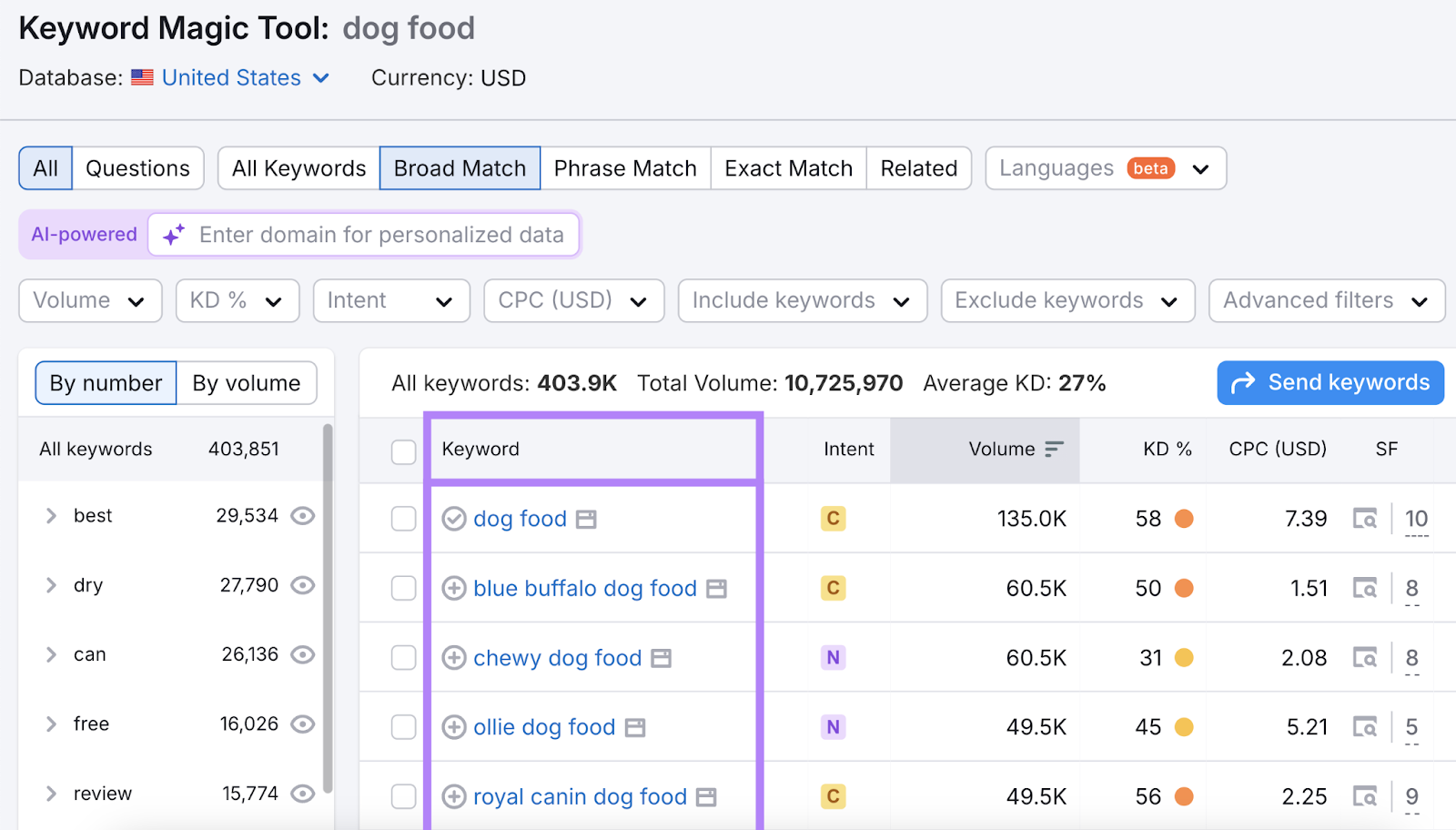
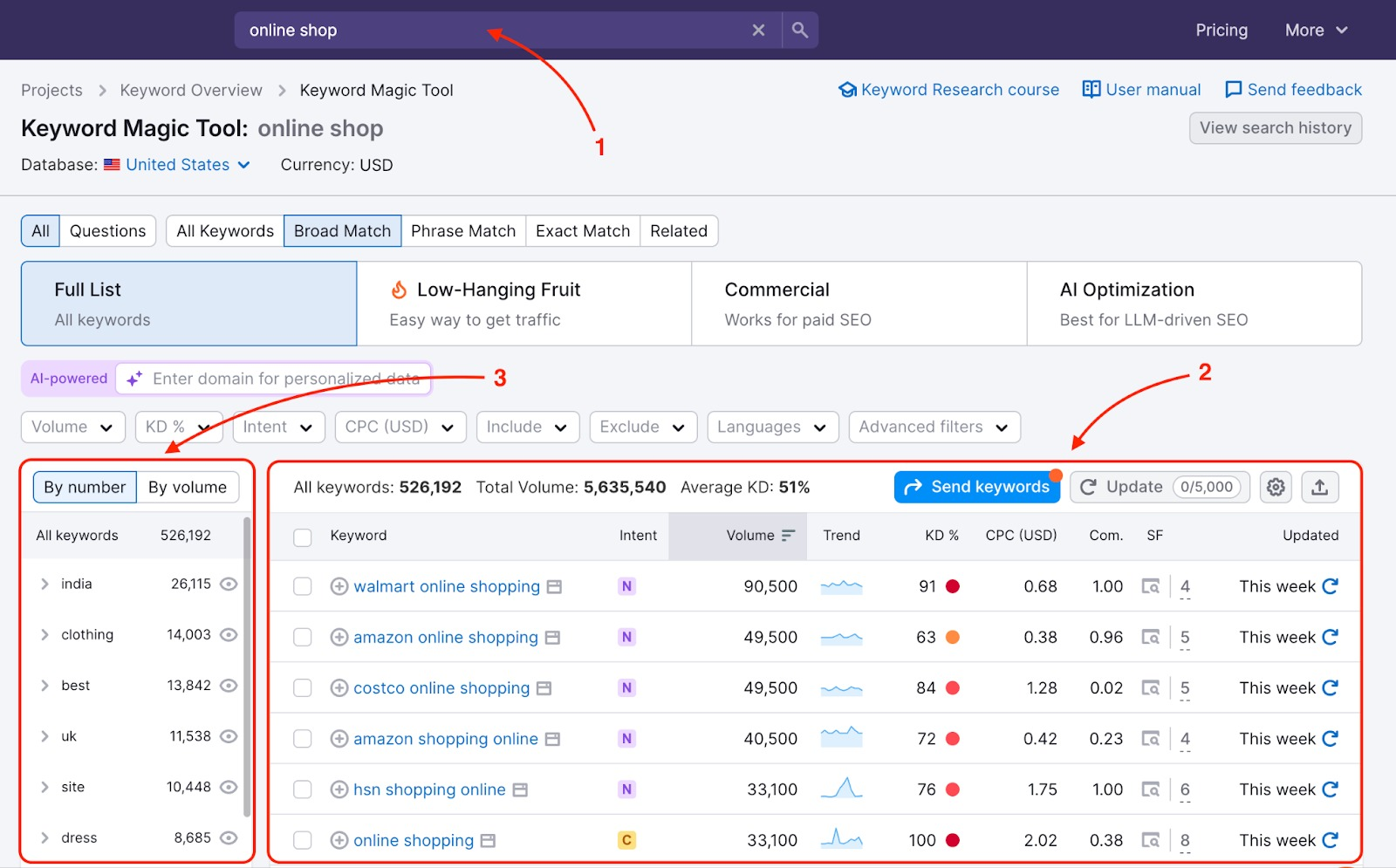
One of the least laborious ways to try to turn a selection into a writable structure is to use the Keyword Magic Tool Generate article frames directly.Semrush's introduction mentions that Keyword Magic Tool generates a large number of relevant keywords, grouped by topic, and displays metrics such as search volume, difficulty, CPC, intent, and more for easy filtering and organization.

Keyword Magic Tool Directly Generates Article Frames: Turning Keywords into Writable Outlines with Semrush

Notes:Semrush defines Keyword Magic Tool as a premium(advanced/paid)Keyword Research ToolsThe company also offers a "Try it free for 7 days" kind of portal. A lot of features usually require a subscription to get full access.

First, set the goal clearly: this article to address which type of search intent

The first step in generating article frames directly with Keyword Magic Tool is not to pull words, but to first determine the type of article. There are just three common types:

  • Tutorials: users are looking for "how to".
  • Choice-based: Users are looking for "how to choose".
  • Comparative: Users are looking for "who's better".

This step determines whether or not you prioritize "Questions" later on, and whether or not you put comparison tables, checklists, or step-by-step paragraphs in the framework, as Semrush emphasizes in the feature description and related articles.Find relevant keywords with Keyword Magic Tool, and then choose the main word around the difficulty and intent of the reachable.

Second, pull out the word group: with the "theme grouping" directly as the article H2

One of the values of Keyword Magic Tool is that it displays related keywords grouped by topic in a sidebar or grouping area.
When doing the framework, you can take the "group name" directly as the article's second-level title (H2), because the group is essentially the user's different concerns under the same theme.

Keyword Magic Tool will display related keywords grouped by topic in the sidebar or grouping area.

2.1 A directly applicable frame-generating methodology

  • Main keyword (H1): pick a word that best represents the topic
  • Theme grouping (H2): pick 5-8 sub-themes from the grouping that are closest to the intention
  • Highly Relevant Long Tail (H3) in a grouping: 2-4 long-tail points per H2

The advantage of this is that the framework doesn't fall apart, and it doesn't just revolve around one word over and over again.

Third, the use of "Questions question word" to write the paragraph more like the user in the question

If you're writing tutorial-type or multiple-choice articles, it's recommended that you turn on or filter for question words directly.Semrush's content also mentions that you can use the "Questions" filter to locate words that are more like question sentences.

3.1 How question words can be placed in a more natural structure

You can use the question word in two positions:

LocationSuitable contentWriting focus
H2 (big problem)The main question readers are most concerned aboutThe first paragraph gives the conclusion and then explains the reasoning
H3 (sub-issue)Specific queries and boundary conditionsGive conditions, steps, cross-references or lists

This makes the article more like a "Q&A" and makes it easier to incorporate the keywords into the text rather than stuffing them in.

IV. Making trade-offs with indicators: making the framework more writable and rankable

Keyword Magic Tool displays search volume, difficulty (KD), CPC, intent, and other data for each keyword, which is used to evaluate doability vs.CommercialThe
When using the Keyword Magic Tool to directly generate article frames, it is not recommended to go for the "hottest", but rather for the "more clearly written".

Keyword Magic Tool displays search volume, difficulty (KD), CPC, intent and more for each keyword.

4.1 A more stable set of screening rules

  • Main words: clear intent, relatively accessible difficulty (don't just look at low KD, look at the type of results page as well)
  • H2 Sub-themes: Prioritize groups that "can write steps, compare dimensions, and criteria for judging"
  • H3 Long-tail: Prioritize words "with conditions", such as "for whom/for what scenarios/how to judge".

You will find that as long as the screening rules are fixed, the quality of the frame will become more and more consistent.

V. The final step in turning the "keyword list" into a "writing outline"

Many people are still stuck in the form. The real "Direct Generation of Article Frames" requires that each headline be written as a "landable paragraph task".

5.1 Paragraph task template (can be applied to every H3)

  • What is the conclusion of this paragraph to be answered
  • What are the most worrying points for readers
  • Give criteria or steps for judgment
  • Use tables for cross-referencing if needed (dimensions, options, advantages, disadvantages, conditions)

When each subheading has a "problem to be solved," the writing speed becomes significantly faster.

Summary:

The key to generating frames directly with the Keyword Magic Tool is not to "export a bunch of words", but to string words together by "Intent → Grouping → Question → Paragraph Task". Grouping is responsible for building the skeleton, problem words are responsible for setting the landing point, and indicators are responsible for making trade-offs. The framework generated in this way is more like an article that can really be written and is closer to the search needs.


Contact Us
Can't read the tutorial? Contact us for a free answer! Free help for personal, small business sites!
Customer Service
Customer Service
Tel: 020-2206-9892
QQ咨询:1025174874
(iii) E-mail: info@361sale.com
Working hours: Monday to Friday, 9:30-18:30, holidays off
© Reprint statement
This article was written by Abby
THE END
If you like it, support it.
kudos6 share (joys, benefits, privileges etc) with others
commentaries sofa-buying

Please log in to post a comment

    No comments