




A key factor often overlooked in website speed optimization: unoptimized images. Unoptimized images slow down page loading, increase server load, and negatively impact SEO, user experience, and conversion rates. EWWW Image Optimizer (commonly referred to as the EWWW Image plugin) offers an automated, visual image optimization solution that addresses issues like image compression, format conversion, oversized dimensions, and slow loading speeds. This article will guide you through using the EWWW Image plugin to quickly resolve these problems.

I. How the EWWW Image Plugin Addresses These Performance Issues
The core philosophy of the EWWW Image plugin is to automate image optimization, resolving the most common image issues with minimal configuration. Its functionality encompasses compression, format conversion, automatic resizing, batch processing, and Lazy Load optimization methods.
2. Automatically compress images to reduce file size
2.1 Automatically compress images upon upload
EWWW automatically compresses images the moment they're uploaded to the media library. It supports lossless compression, controllable lossy compression, and intelligent algorithms, typically reducing file sizes by 40% to 80% with virtually no visual quality difference.
2.2 Supports multi-format compression
Including common formats such as JPG, PNG, GIF, PDF, and WebP, it can cover the needs of most websites.
3. Batch-optimize old images and effortlessly handle legacy content.
For websites that have been running for years, the media library has accumulated a large number of unoptimized images.Batch Optimization Feature of EWWWIt can scan your media library, automatically list files that need optimization, and perform batch compression with a single click.
3.1 Applicable to the following scenarios
- Migrating Old Sites (Image Optimization When Moving Websites from Other Platforms to WordPress)
- Content-rich blog (featuring a wealth of historical articles and images)
- E-commerce site (featuring a large number of product images)
- Media Library (Sites with inconsistent image sizes and quality)
3.2 Simple Operating Procedure
- Enter Bulk Optimize
- Scan Media Library
- Execute one-time optimization
- View compression before and after comparison and space savings
![Image[2] - EWWW Image Optimizer Guide to Improving Website Performance](https://www.361sale.com/wp-content/uploads/2025/11/20251117142443919-image.png)
4. Convert to WebP or AVIF to further accelerate page loading
4.1 Advantages of WebP
The EWWW Image plugin can automatically convert JPG and Convert PNG to WebP or AVIF format, while intelligently adapting to users' browsers without requiring any modifications to themes or front-end code.
- File size reduction from 301TB to 501TB: Compared to JPEG images of equivalent quality
- Supports alpha channels: Replaces PNG without losing transparency effects
- Google Recommended Format: As a key measure for optimizing Core Web Vitals
- Excellent browser compatibility: Covers over 95% of global user browsers
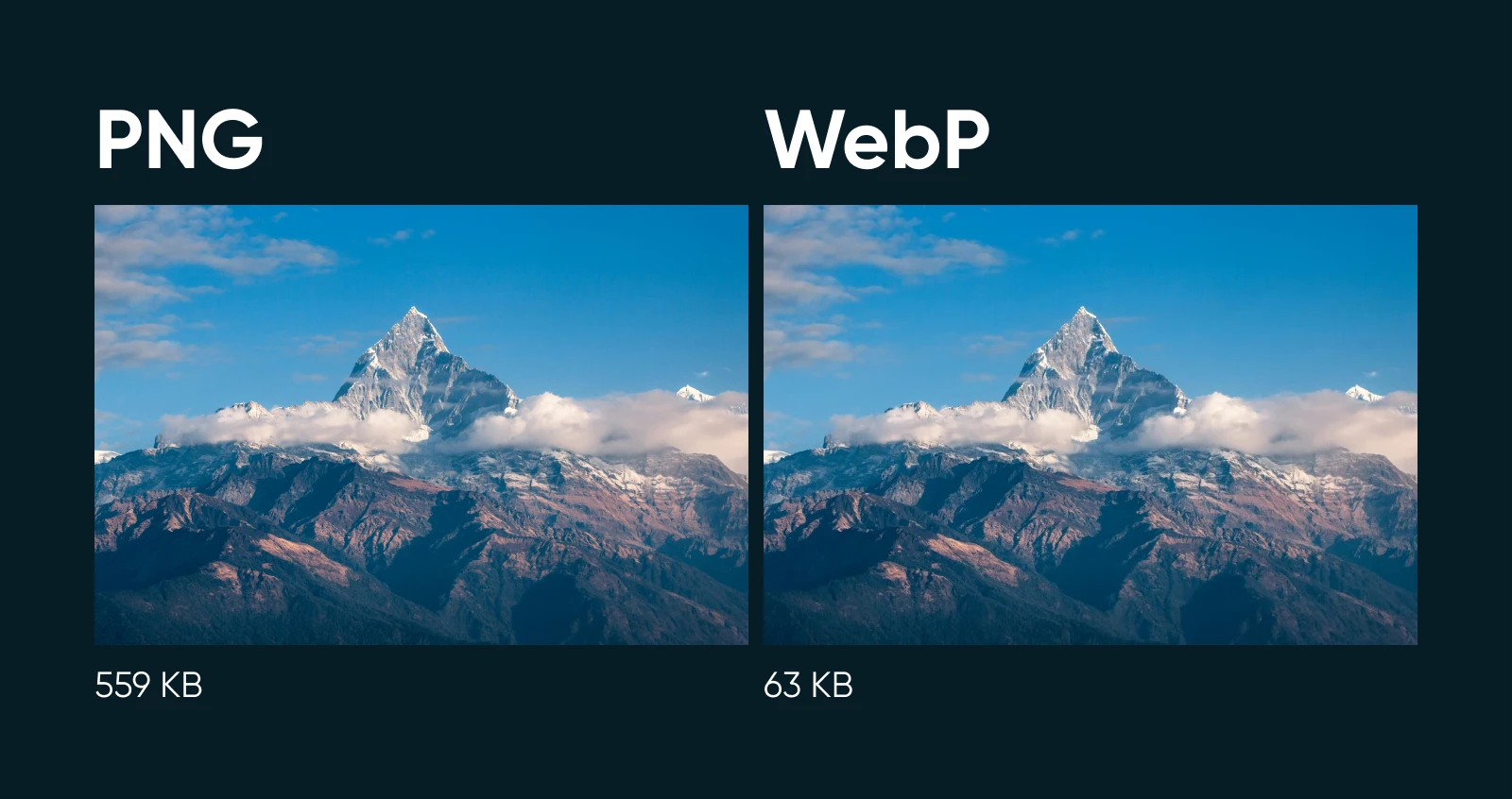
4.2 Automatically generating WebP files does not alter image links.
Plugins handle this through rule overrides, which won't affect SEO and don't require modifying image paths.
5. Smart resizing to prevent uploading oversized original images
Many users directly upload camera raw images or large photos taken with their phones, which are excessively large, unsuitable for web display, and severely slow down website loading speeds.EWWW can set maximum width and height in pixelsAutomatically resize images to fit web page dimensions. Automatic image resizing offers multiple benefits:
- Reduce file sizeReducing the resolution directly decreases the file size.
- Improved loading speedSignificant reduction in data transmission volume
- Uniform display effectEnsure consistent image style across the website.
- Reduce bandwidth costs: Especially for virtual hosting with limited bandwidth

VI. Lazy Load: Delayed Loading to Improve Initial Visible Speed
Lazy Load Technologypass (a bill or inspection etc)delayed loadingImages placed in non-viewport areas significantly boost first-screen loading speed, particularly for sites with numerous article images or extensive product listings, substantially improving initial page load times:
- Mobile OptimizationThe effect is particularly noticeable under limited network bandwidth.
- Long Article PagePages with extensive text-image layouts show significant performance improvements.
- Product Listing PageEssential for e-commerce websites with large product image collections
- Image library websitesCore Optimization Techniques for Image-Heavy Websites
7. Advantages of Using CDN Acceleration with EWWW
EWWW's Easy IO CDN or integration with third-party CDNs can deliver the following additional benefits:
- Global Node DistributionEnable users everywhere to load images from the nearest node.
- Reducing the burden on serversImage requests are handled by CDN, reducing server load.
- High-Traffic HandlingEven during peak traffic periods, it maintains fast and stable performance.
- Smart Format DeliveryAutomatically deliver the optimal format to supported browsers using WebP.
8. Performance Improvements After Using EWWW
Based on practical experience, enabling EWWW typically results in the following noticeable improvements for websites:
8.1 Technical Specifications Enhancement
- Image size reduced by over 501TB: Saves a significant amount of space per image on average
- Overall loading time reduced by 2-5 seconds: Specifics depend on the original website's status.
- Core Web Vitals significantly improved::
- LCP (Largest Contentful Paint): Improved by 30-60%
- CLS (Cumulative Layout Shift): Reduced by 40-80%
- FID (First Input Delay): Improved 20-50%
- Mobile Performance Score: From the typical 40-50 points to over 80 points (Google PageSpeed Insights)
8.2 Business Metric Improvement
- Bounce rate decreasedUsers are more likely to stay and browse, with bounce rates decreasing by 15-30%.
- Page dwell time increasedContent readability improved, with session duration increasing by 20-40%
- Conversion rate improvementEspecially for e-commerce websites, conversion rates increase by 5-15%.
- SEO Ranking ImprovementPage load speed is a significant ranking factor, leading to a noticeable increase in organic traffic.
These optimizations not only enhance the user experience but also elevate the site's overall commercial value.

Link to this article:https://www.361sale.com/en/80850The article is copyrighted and must be reproduced with attribution.




















![Emoji[wozuimei]-Photonflux.com | Professional WordPress repair service, worldwide, rapid response](https://www.361sale.com/wp-content/themes/zibll/img/smilies/wozuimei.gif)

![Emoticon[baoquan] - Photon Wave Network | Professional WordPress Repair Services, Worldwide Coverage, Rapid Response](https://www.361sale.com/wp-content/themes/zibll/img/smilies/baoquan.gif)


 简体中文
简体中文  English
  日本語
日本語  Français
  Español


No comments