




The WordPress site's backend no longer has a feedback section.This typically indicates that configurations have been incorrectly modified, plugins are causing conflicts, or permissions have been altered. Since the feedback section corresponds to the data entry point for WordPress's built-in "Contact Form Feedback" or related plugins, any improper settings may cause it to disappear from the backend menu. This article will analyzeCommon Causes of Missing Feedback Sections in WordPress Admin PanelsHelp newcomers quickly regain normal functionality.
1. The Five Most Common Mistakes Beginners Make: Directly Causing the Backend Feedback Section to Disappear
Below are five of the most common configuration errors, presented in a table format to make troubleshooting more intuitive.
| serial number | Type of error | Impact Mechanism | show off | Recommended troubleshooting methods |
|---|---|---|---|---|
| 1 | Disable Form Plugin | Plugin failed to load menu hook | The feedback section has completely disappeared. | Check Plugins → Re-enable |
| 2 | Modify User Role Permissions | Menu access capability is disabled. | Only administrators cannot see the section. | Check User Role Plugin Settings |
| 3 | plug-in conflict | Cover or hide the menu | Multiple menu items have disappeared simultaneously. | Disable conflicting plugins one by one |
| 4 | Theme functions.php Modifications | Menu hooks have been removed. | Disappeared after changing the theme | Switch to default theme |
| 5 | Database corruption or menu cache abnormality | Menu structure failed to load | Occasional disappearance | Clear cache, repair database |
These errors account for 80% of the "WordPress admin dashboard missing feedback section" issue. Beginners can troubleshoot by following the steps in the table order.
2. Plugin disabled or deleted: The most common reason why the feedback section disappears from the WordPress admin dashboard.
If you've enabled a plugin like Contact Form 7 but can't see the feedback panel, the reason is usually that the user accidentally deleted Flamingo (the plugin responsible for storing emails).
The logic is as follows:
- Contact Form 7 provides forms
- Flamingo offers a feedback section in the backend.
Once Flamingo is deleted, it will appear. The WordPress site's backend no longer has a feedback section. This issue can be quickly identified via the plugin list. If the plugin has indeed been deleted, fromOfficial Plugin RepositorySimply reinstall it.

3. Improper configuration of user role or permission plugins: Backend sections are hidden.
Many new webmasters install permission management plugins (such as User Role Editor or Members), which allow modifying the admin menu. However, these plugins may inadvertently disable the capability associated with the feedback section.
When the feedback section disappears from the WordPress admin dashboard, check the following:
- Has the user role been modified?
- Is it disabled?
manage_optionsor plugin-specific permissions - Should the menu be hidden?
The documentation for permission plugins all states: If the capability is not met, the menu will not be displayed.
Exclusionary approach:
- Temporarily disable all permission control plugins
- Refresh Backend Menu
- If the section is restored, it is a permission configuration issue.
4. Plugin conflicts causing backend menu disappearance: A common yet difficult-to-identify scenario
Multiple plugins simultaneously manipulating backend menus may cause conflicts. For instance, when SEO plugins, optimization plugins, and form plugins all load menu hooks, naming space conflicts or duplicate menu position IDs can trigger hiding or overwriting issues.
Methods for identifying plugin conflicts:
- Deactivate plug-ins one by one
- Each time the feedback section is disabled, check whether it has been restored.
- Record conflict plugins and update or replace them with alternatives
When the "merge menus" feature of certain optimization plugins is enabled, it will also trigger The WordPress site's backend no longer has a feedback section. Particular attention should be paid to this issue.
5. Theme file modification error: Improper code in functions.php may remove menus.
Many beginners, when following online tutorials to modify their theme's functions.php file, use code similar to the following to hide menus:
remove_menu_page('edit.php?post_type=feedback');This type of code will directly result in The WordPress site's backend no longer has a feedback section.After switching themes, the issue resolved itself, making themes a key focus for troubleshooting.
Check the way:
- Open the functions.php file for the current theme.
- Search for the `remove_menu_page` or `admin_menu` hooks
- Comment out the relevant code and refresh the backend.
If the section is restored, the issue has been confirmed.
6. Database anomalies or backend caching preventing menu loading: Occasional but must be ruled out.
If the website has a caching plugin or server-side caching (such as Nginx FastCGI caching or Redis), menu changes may be overwritten by stale caches.
At this point, you might also experience the illusion that the "Feedback" section has disappeared from the WordPress site's backend.
Exclusionary approach:
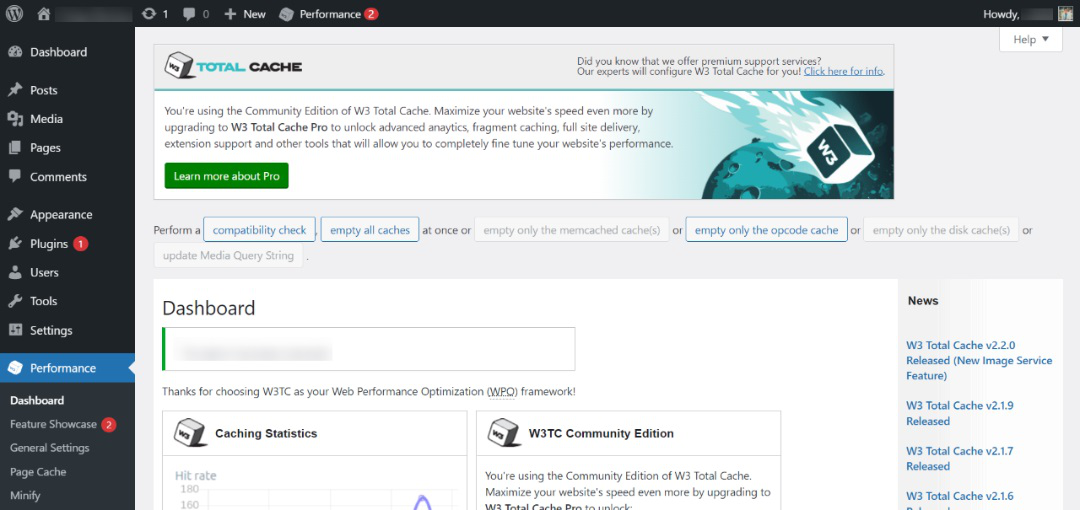
- Clear WordPress Cache
- Clear Browser Cache
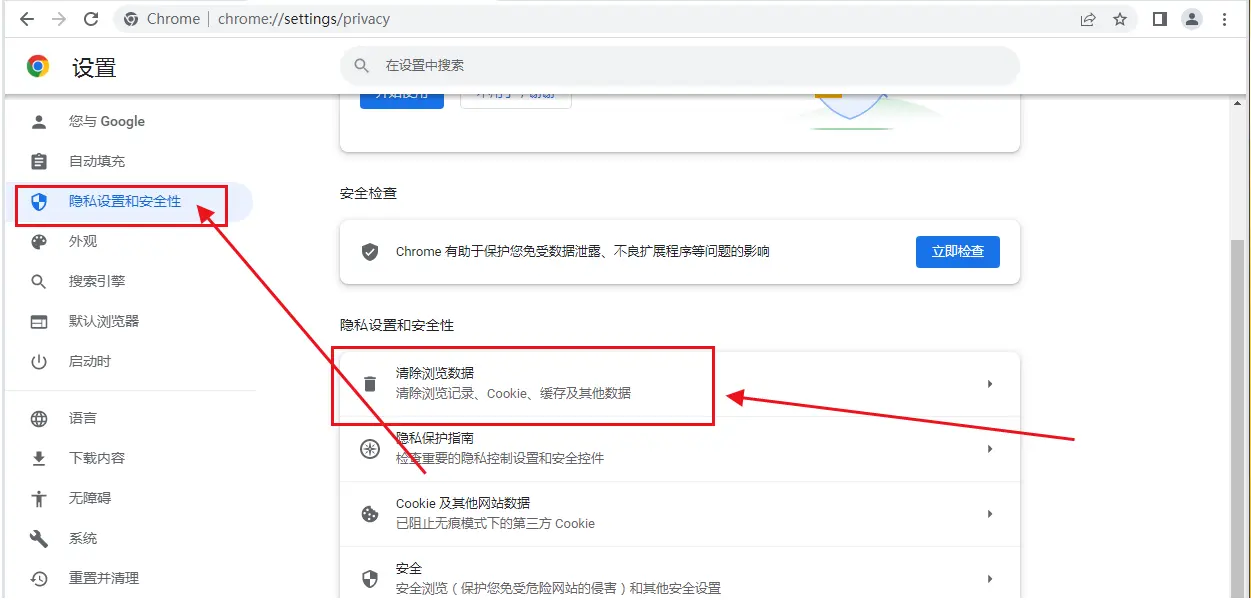
These operations can eliminate false disappearances caused by caching.
7. Quick Troubleshooting Example: Restore Feedback Section by Priority Order
To make the inspection more intuitive, the following troubleshooting sequence diagram can be used:
- Check if the plugin is enabled
- Check Permissions Management Plugin
- Deactivate all plugins
- Switch to default theme
- Empty the cache
- Check the database
- Gradually restore plugins and themes
This process is applicable to all WordPress sites where the feedback section is missing from the backend, significantly improving troubleshooting efficiency.

Link to this article:https://www.361sale.com/en/82533The article is copyrighted and must be reproduced with attribution.


















![Emoji[wozuimei]-Photonflux.com | Professional WordPress repair service, worldwide, rapid response](https://www.361sale.com/wp-content/themes/zibll/img/smilies/wozuimei.gif)

![Emoticon[baoquan] - Photon Wave Network | Professional WordPress Repair Services, Worldwide Coverage, Rapid Response](https://www.361sale.com/wp-content/themes/zibll/img/smilies/baoquan.gif)


 简体中文
简体中文  English
  日本語
日本語  Français
  Español


No comments