




When doing WordPress SEO, the biggest pitfalls aren't about "what to write," but rather "what shouldn't be seen": wasted crawl budget, duplicate pages crowding indexing, and feature pages accidentally appearing in search results. In practice, remember two things first: the "Reading Settings" in the backend has a site-wide visibility toggle, while more granular rules require managing by page type; you can also start by...Robots.txt Configuration Complete GuideThe approach involves treating "crawlability" and "indexability" as separate layers.
![Image[1] - robots.txt Ultimate Guide: WordPress Indexing Blocking and noindex Strategy](https://www.361sale.com/wp-content/uploads/2026/01/20260104174515992-image.jpeg)
1. First, understand the distinct roles of robots.txt and noindex.
1.1 Are you controlling "access" or "appearance in results"?
robots.txt functions more like an access control system: it informs crawlers which areas to avoid, helping reduce unnecessary crawling and prevent frequent access to system directories. However, it does not equate to "disappearing from search results," as links may still be discovered through external references or internal navigation.
noindex is more like a deindexing tag: the page remains accessible, but search engines are explicitly instructed not to include it in their indexes. If you truly want to "prevent indexing," prioritize using noindex; if you want to "conserve crawling resources," then use robots.txt in conjunction.
1.2 Common Misconceptions About Combining the Two
Many sites block certain pages from being crawled via robots.txt while also adding noindex tags to those pages. This approach often backfires: Crawlers can't access the pages, so they never see the noindex directive, potentially leaving the pages in a prolonged "discovered but unprocessed" state. A more reliable approach is to keep pages requiring noindex accessible to crawlers, placing the control point in the meta tag or response header instead.
2. Which pages should be marked noindex: Start by identifying "thin content" and "functional pages."
2.1 Feature Flow Page: Useful for users, meaningless for search
Pages such as shopping carts, checkout, account centers, order details, internal search results, and login/registration pages contain highly personalized content or lack reusable information. Their appearance in search results lowers overall quality signals and may create privacy and conversion disruptions. If you use Yoast to manage rules, you can compare them againstYoast SEO TutorialSet all such functional pages to noindex.
2.2 Archive Aggregation Pages: Index content that can be indexed; noindex content that cannot be indexed.
Author archives, date archives, tag archives, empty category pages, and deep paginated pages often suffer from "too many listings, too little information, and minimal differentiation." If you're willing to enhance these archive pages with descriptions, curated content, and structured navigation, they can become long-tail entry points. Otherwise, decisively implement noindex to avoid duplication and dilution. For quick handling of empty category and tag pages, refer to:Hide unnecessary category directoriesThe approach is to first shut down "aggregated pages lacking substantive content."
2.3 Attachment Pages and Automatically Generated Pages: Prioritize Site-Wide Processing
Many themes generate attachment pages for each image, typically featuring only a single image and minimal text, making them virtually worthless for search value. A better strategy is to redirect attachment pages to the media file or corresponding post content, and set the attachment type to noindex by default in SEO plugins to minimize the spread of "thin content."
3. Which paths should be included in robots.txt: Don't let crawlers spin their wheels in the background
3.1 Backend and System Resources: Reduce Worthless Crawling
The backend admin area, editor interfaces, plugin resource directories, temporary files, and cache directories should neither appear in search results nor be frequently crawled. Including them in robots.txt serves to reserve crawl time for article pages, product pages, and core category pages.
3.2 True "Privacy" Shouldn't Rely Solely on robots.txt
robots.txt is neither encryption nor permission control. To protect account information, order details, and member content, you should implement login permissions, server-side blocking, and proper caching strategies—not pin your hopes on a single line of disallow rules.
4. Implement via plugins: Turn rules into "maintainable defaults"
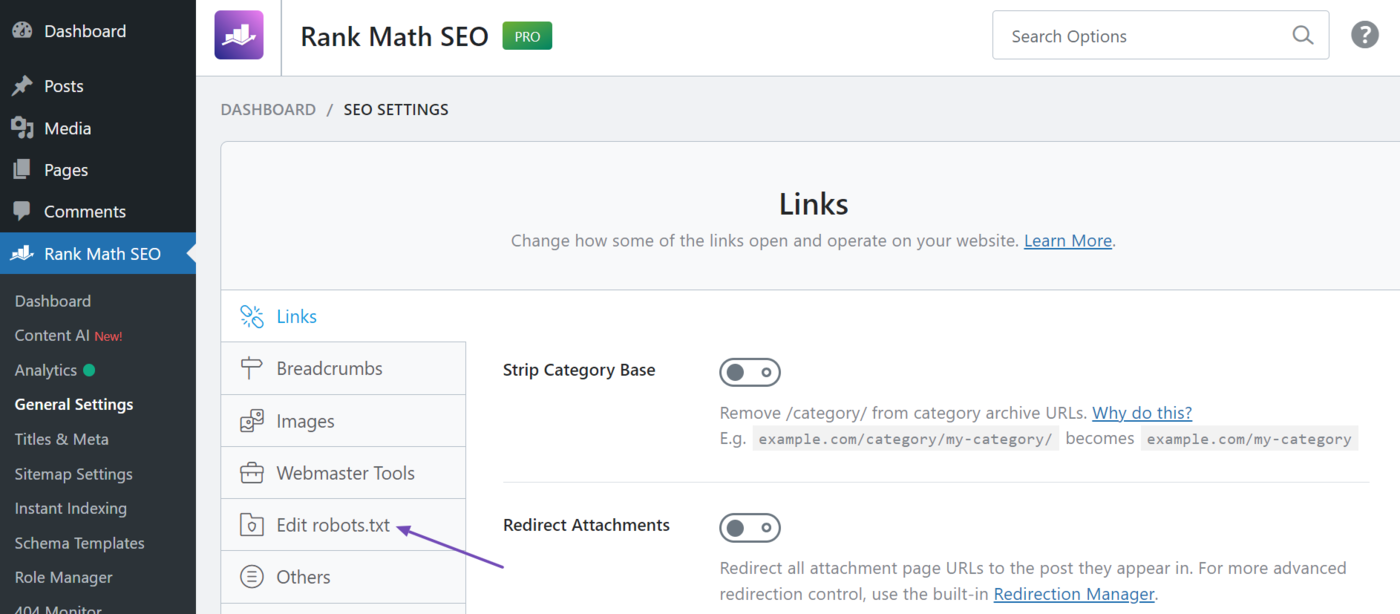
4.1 Unified Maintenance of robots.txt via Visual Editor
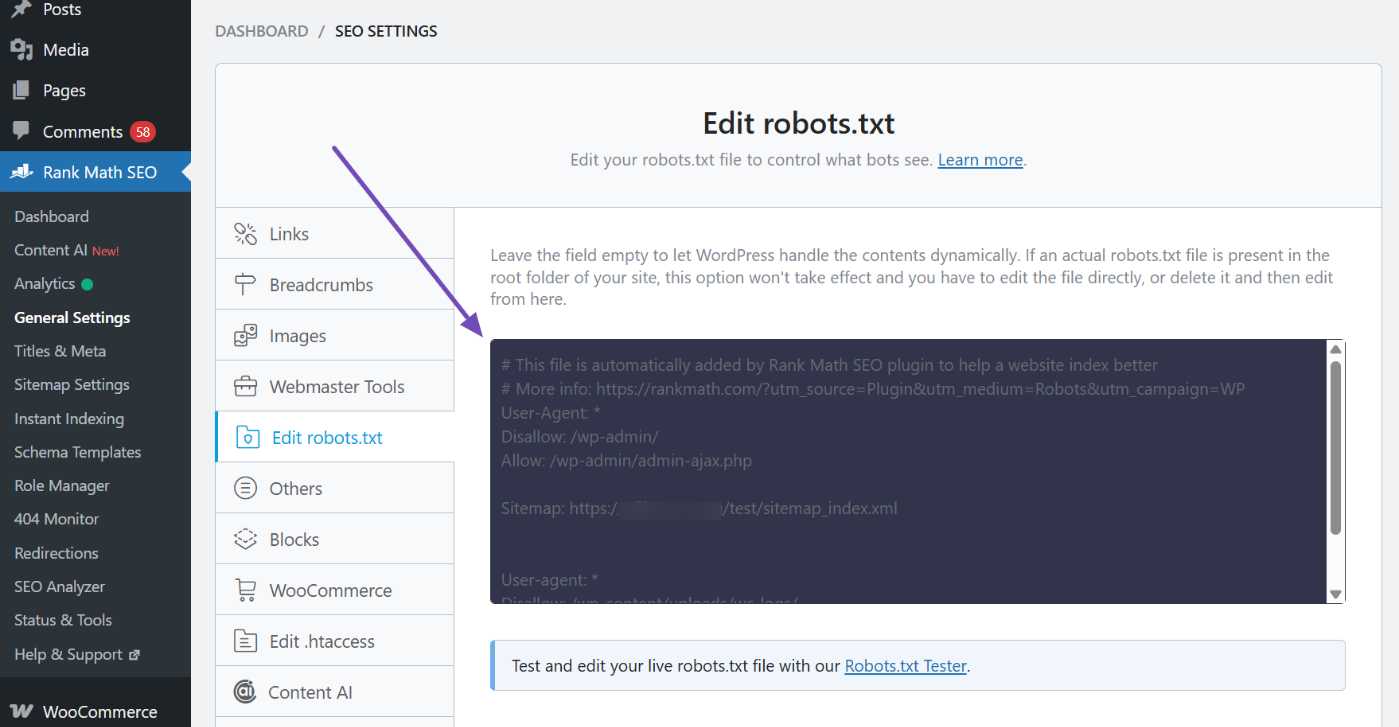
If you wish to manage robots rules through a graphical interface, it's recommended to centralize all rules under a single entry point. This prevents rules from becoming scattered or forgotten during multi-user collaboration. When editing, focus solely on two tasks: blocking clearly non-valuable system areas and declaring sitemap locations. Avoid indiscriminately adding "pages requiring noindex" to the disallow list.
4.2 After modifying the rules, perform regression testing.
After each adjustment, test at least four types of pages: core content pages, core category pages, typical archive pages, and typical feature pages. Confirm which pages are allowed to be crawled and which are blocked. Especially after changing themes, switching plugins, enabling caching, or activating CDN, regression testing prevents "rules being overwritten without anyone noticing."
![Image [4] - robots.txt Ultimate Guide: WordPress Indexing Blocking and Noindex Strategies](https://www.361sale.com/wp-content/uploads/2026/01/20260104175117593-Testing-robots.txt-file-1.png)
4.3 Use the Robots Meta Tag to Control "Whether to Index"
Place noindex control points in the Robots Meta: Establish a global default setting first, then grant individual exceptions for a small number of pages. This approach ensures new pages go live without omission while transforming "what can be indexed" into a team-executable standard.

5. Synchronize Sitemaps and Index Checks: Help Search Engines Find Your Content More Efficiently
5.1 Do not include noindex pages in the sitemap.
A sitemap acts as a "recommended crawl list." When you set a category of pages to noindex, it's best to remove them from the sitemap simultaneously to prevent search engines from repeatedly discovering the same batch of pages that shouldn't be indexed. When you need a checklist, you can conveniently refer to it.Site Map Creation and Optimization GuideUnify what should be reported with what should be concealed.
5.2 Single-Page Exceptions: Greenlight pages that genuinely fulfill search intent
Some pages that appear to be archives can actually be developed into special features; certain functional pages may serve as entry points within specific business contexts. At the individual page level, overriding default policies should be permitted: when you confirm a page can answer user queries and possesses independent value, change its status from noindex back to indexable, and complete its title, body content, and internal linking.

6. A ready-to-use set of criteria
6.1 Three-Question Method: Determining Whether a Page Should Be Indexed
First question: Can it independently address a search intent without relying on login or personalized content? Second question: Is it sufficiently distinct from other pages on the site to avoid significant duplication? Third question: Is it worth maintaining long-term and capable of continuous improvement? Only if all three questions can be answered with "yes" should we consider opening it for indexing.
6.2 Four Categories of Priority: Focus Your Efforts Where They Matter Most
Prioritize indexing: Article pages, product pages, core category pages, and genuinely feature-worthy aggregation pages. Prioritize noindex: Internal search results, account and order-related pages, empty archives and deep pagination, attachments and auto-generated pages. Prioritize robots.txt: Backend and system directories, paths to low-value resources. Finally, add an extra layer of information architecture: ThroughWordPress TaxonomyOrganize your content more clearly, and search engines will naturally be more inclined to allocate weight to the pages you want to promote. If indexing anomalies appear to be "under review," it's also advisable to first follow the recommended procedures.Complete Guide to Recovery MethodsEliminate configuration errors. ::contentReference[oaicite:0]{index=0}

Link to this article:https://www.361sale.com/en/85059The article is copyrighted and must be reproduced with attribution.

















![Emoji[wozuimei]-Photonflux.com | Professional WordPress repair service, worldwide, rapid response](https://www.361sale.com/wp-content/themes/zibll/img/smilies/wozuimei.gif)

![Emoticon[baoquan] - Photon Wave Network | Professional WordPress Repair Services, Worldwide Coverage, Rapid Response](https://www.361sale.com/wp-content/themes/zibll/img/smilies/baoquan.gif)


 简体中文
简体中文  English
  日本語
日本語  Français
  Español


No comments