




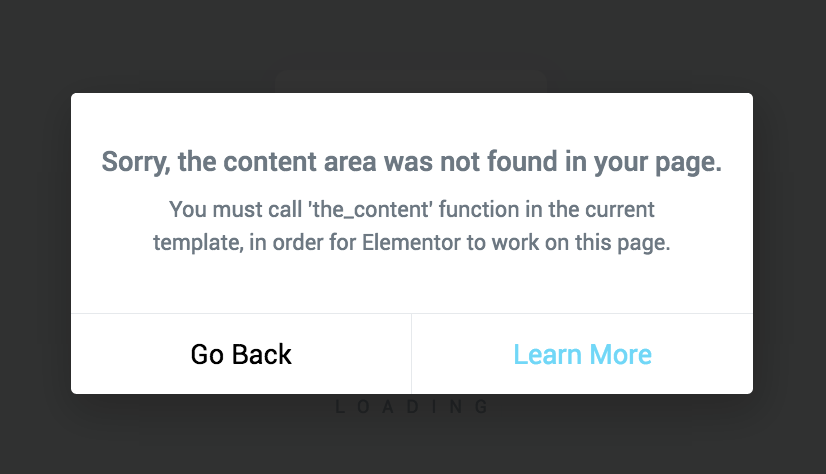
When Elementor pops up the "you must call the_content" (or something similar), it means that theYour page template is not outputting correctly the_content()(or not letting the_content (Filter in effect)If you have a problem with Elementor, the rendering of Elementor's content will "not hang", so the frontend may be blank, the layout is missing, and the editor will have all kinds of anomalies. In the following, in the order of "Root Cause → Quick Locate → Fix Solution", we put Call the_content Let's talk about this once and for all.
1. Why does Elementor rely so heavily on calls to the_content??
Elementor's front-end content is, in essence, output through the WordPress content system:
- Theme templates are exported in The Loop
the_content() - Elementor mounts its own renderings to the
the_contentfilter link - Theme Calls
the_content()When the filter is triggered, Elementor can output the layout/widget HTML.
So as long as your templateNo call. the_content(), or used in the wrong way (e.g., only using the get_the_content()).Elementor then determines "template incompatibility".and thus suggests that it is necessary to Call the_contentThe
2. 6 most common root causes (from highest to lowest hit)
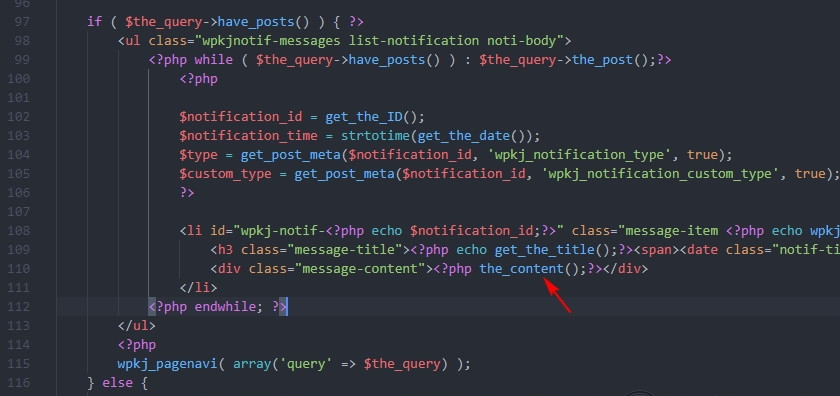
2.1 The template uses the get_the_content()But no. the_content()
Many people write for "custom output":
echo get_the_content();
This will bypass the the_content of the filter link, Elementor content naturally does not appear.
Conclusion: need to change to call the_content(), or at least apply_filters.
2.2 Customize page.php / single.php / custom template file missing The Loop + the_content
Commonly: you copy a template from another theme, and during the deletion process you put the the_content() Removed, or Loop is incomplete.
2.3 template-parts/content-*.php No call to the_content
Many of the topics in the page.php neighborhood get_template_part()The real output content is in the template-parts/content-page.php. You check page.php and see Loop, but content-page.php may be outputting only the title/summary, no the_content()The
2.4 You made a custom WP_Query, but forgot to output the content
Let's say you write a custom query loop that outputs only the title, thumbnail, and fields, without the the_content()Elementor will still consider it incomplete. Call the_contentThe
2.5 Security/performance plug-ins or your own code removed the_content (machine) filter
It's rare, but it does happen: people write remove_filter('the_content', ...)This causes the Elementor mount link to fail.
2.6 Block theme / FSE template mixup, one template not outputting content correctly
If you're using a block theme (Site Editor) and overlaying a custom PHP template or an old template, it may appear that a certain type of page (such as a single post) is missing content output.
3. 3-minute quick localization: which template is at fault?
3.1 Make sure that "only some pages are reporting errors, or the whole site is reporting errors".
- It's all over the station.: Priority check
single.php / page.php / index.phpor theme framework level templates - Only report on a template(e.g. a page template, a single CPT page): prioritize the corresponding template file
3.2 Targeting theme template issues by "least exclusion"
- Temporary switch to Hello Elementor(or Twenty Twenty series)
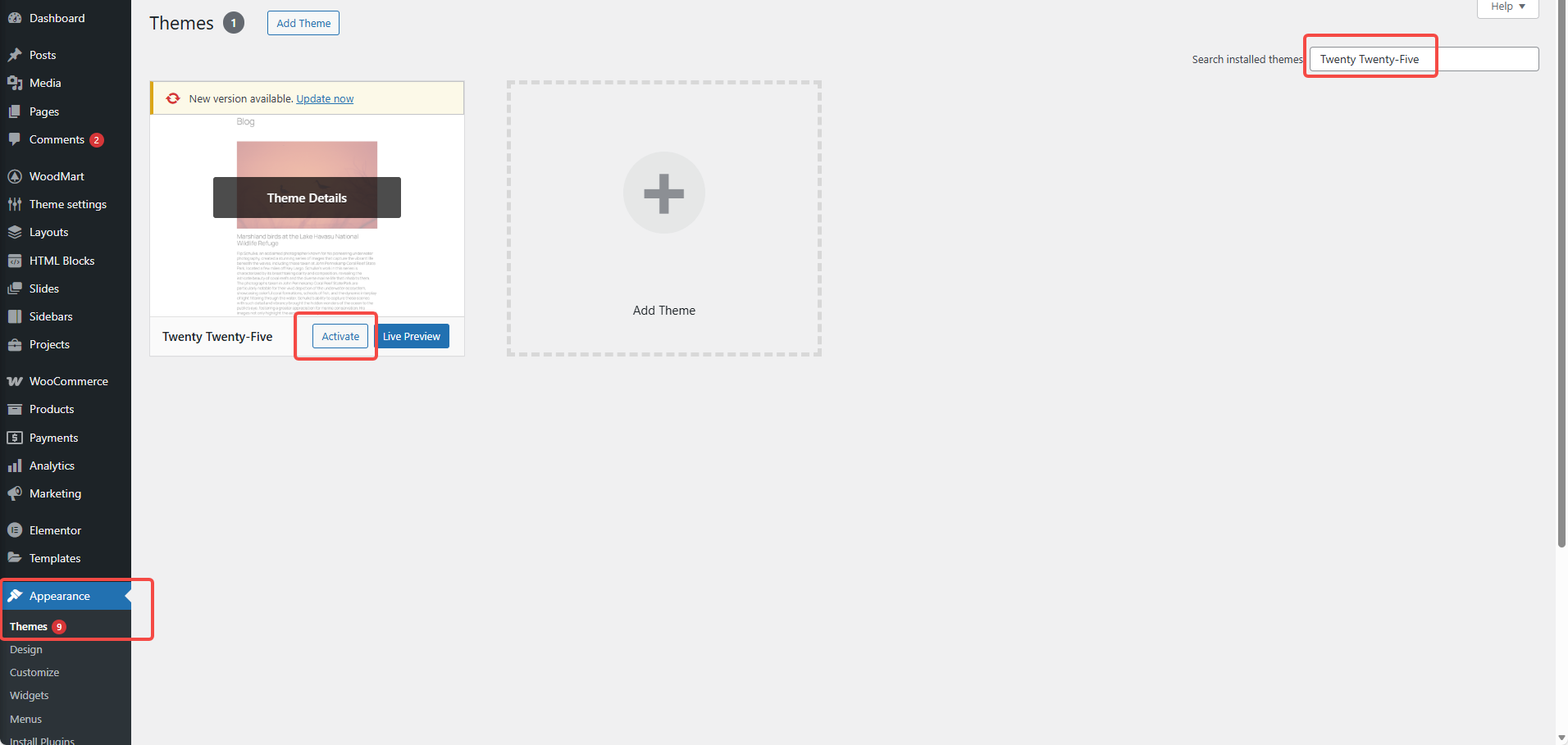
- If the prompt disappears: 99% is your current theme template is not correct Call the_content
- Cutting back to the original thread to continue the fix
3.3 Directly check the template used for your page
- Right side of WordPress edit page: templates (default/custom templates)
- Elementor: Layout/templates can also be seen in the page settings
If a custom template is used (e.g.template-custom.php), then prioritize checking this file.
4. Restoration program A: Change the template to "standard writing style" (recommended)
Here's one for you.minimum usablepage template structure (page.php / single.php is along similar lines), the point is: there's a Loop, and it's in the right place. Call the_contentThe
4.1 page.php (minimum correct example)
</main
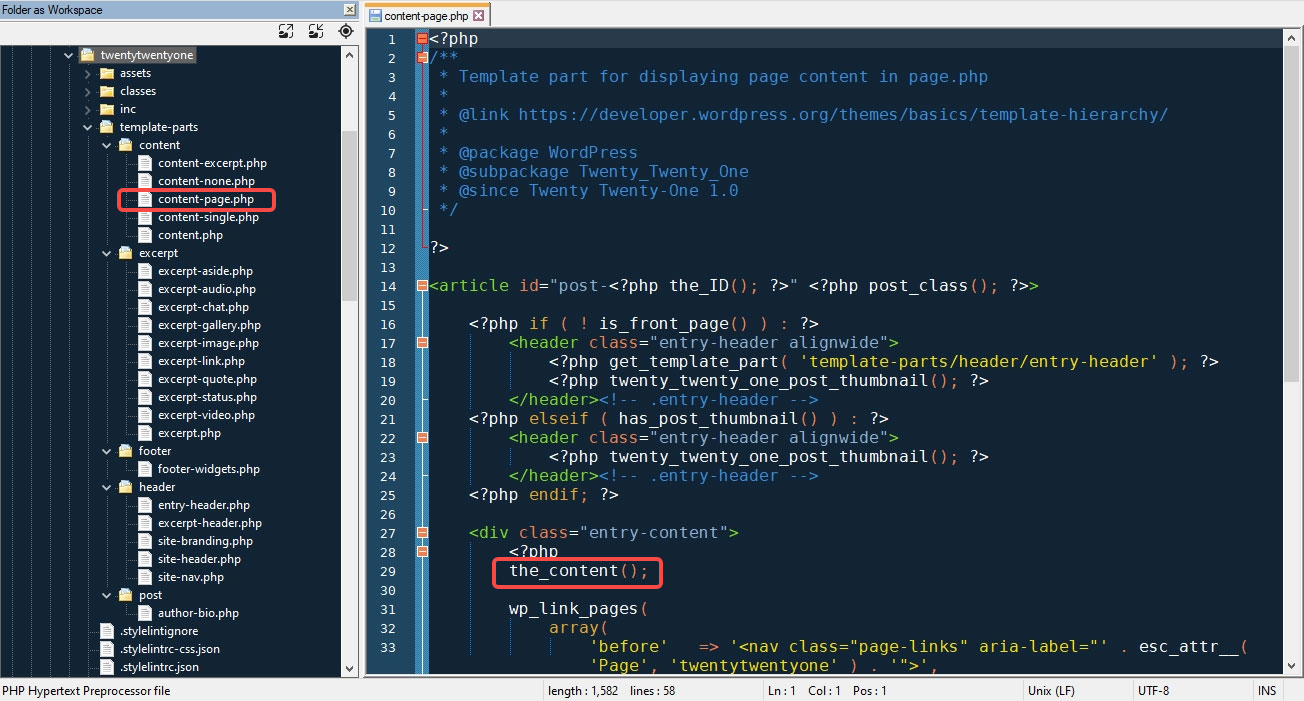
If your subject must go template-partsMake sure that the content file also has the_content()The
4.2 template-parts/content-page.php (common missing points)
<article id="post-" >

</article
5. Fix B: Don't forget to apply_filters when you have to use get_the_content!
There are some scenarios where you do have to take the content and do secondary processing (e.g. inserting modules, segmented rendering). This is when it's important to make sure that at least the_content The filter will run:
<?php
$content = get_the_content();
echo apply_filters('the_content', $content); // ✅ trigger the_content filter link
This one is critical: a lot of "it looks like the content is called but the Elementor doesn't show it" problems are rooted in the fact that the filter isn't triggered, so the Elementor doesn't have a chance to output it.
6. Remedy C: Check and undo "code to intercept the_content".
If you or the plugin have done the following, it is recommended to undo it before verifying:
remove_filter('the_content', 'wpautop');remove_all_filters('the_content').- Anti-injection/shortcode/HTML filtering for security plug-ins (to see if it affects the content filter chain)
Exclusionary Tips:
Disable recently added/updated performance and security plugins (caching, acceleration, WAF, content filtering) and see if the prompts disappear. If it disappears, then enable positioning one by one.
7. 4 "finishing touches" that must be done after restoration (so you don't think it's not fixed)
- Elementor → Tools → Regenerate CSS/Data
- Clear cache: page cache, object cache,CDN Caching(if you're using)
- Check for multiple template overlays (Theme Templates + Elementor Theme Builder)
- Frontend opens in a no-trace window to avoid browser cache interference
Summarize: one sentence to determine whether the repair is successful
The success of the fix is not measured by the "hints disappearing", but rather:
- Normal rendering of the front page Elementor layout
- Elementor editor preview normal
- Theme templates where it really happens Call the_content(or
apply_filters('the_content', ...))

Link to this article:https://www.361sale.com/en/86733The article is copyrighted and must be reproduced with attribution.
















![Emoji[wozuimei]-Photonflux.com | Professional WordPress repair service, worldwide, rapid response](https://www.361sale.com/wp-content/themes/zibll/img/smilies/wozuimei.gif)

![Emoticon[baoquan] - Photon Wave Network | Professional WordPress Repair Services, Worldwide Coverage, Rapid Response](https://www.361sale.com/wp-content/themes/zibll/img/smilies/baoquan.gif)


 简体中文
简体中文  English
  日本語
日本語  Français
  Español


No comments