





Open-source content management systems (CMS) have become essential tools for website development and content management, significantly enhancing efficiency—particularly in content production and collaboration. WordPress, as the world's most popular open-source CMS, is widely adopted across diverse websites due to its flexibility and robust capabilities. Its open-source nature enables users to freely modify and extend the platform, ensuring long-term sustainability. This article explores the advantages of open-source CMS and highlights WordPress's unique positioning within this field.
![Image[1] - Open-Source CMS Deep Dive: Mastering WordPress' Core Positioning](https://www.361sale.com/wp-content/uploads/2025/12/20251220182134679-WordPress_blue_logo.svg-1.png)
1. What is an open-source CMS? WordPress's Position in Open-Source Content Management Systems
Open-source CMS refers to a category of software systems designed to create, manage, store, modify, and publish digital content, with its source code made publicly available under an open-source license. For content teams, it enables sustainable publishing. For technical teams, it allows for controlled expansion and migration. Understanding WordPress's positioning hinges on first grasping the concept of open-source. CMS The boundaries and value of the ecosystem, and why it has remained at the center for so long.
![Image[2] - Open-Source CMS Deep Dive: Mastering WordPress' Core Positioning](https://www.361sale.com/wp-content/uploads/2025/12/20251220182147243-Post_cms_block_diagram.jpg)
2. What exactly does CMS solve?
Many people assume that building a website is the hardest part, but the real challenge in long-term operation lies in content creation, collaboration, and maintenance. CMS standardizes these processes, allowing you to focus your energy on the content itself.
2.1 List of Common CMS Capabilities
- content editorArticles, Pages, Drafts, Previews, Revision History
- Organizational Management: Categories, Tags, Menus, Site Structure
- Media Library: Upload, Reuse, Replace, and Manage Images and Attachments
- Permission Collaboration: Role Division Among Authors, Editors, and Administrators
- Release Process: Scheduled releases, rollbacks, controlled deployments
2.2 Differences Between Open-Source CMS and Website Generators
- Website builders function more like all-in-one services—convenient, but often limited in migration and deep customization.
- Open-source CMS platforms function more like controllable platforms, enabling self-hosting and secondary development, with data and code more easily kept under your own control.
3. What is an open-source CMS?
Open source isn't merely about being free or simply having source code available. More importantly, open source licenses explicitly grant rights to use, modify, and redistribute the software, while also setting rules for distribution. For webmasters, this determines how extensively you can utilize the system and whether you'll be locked into a single platform.
![Image [3] - Open-Source CMS Deep Dive: Mastering WordPress' Core Positioning](https://www.361sale.com/wp-content/uploads/2025/12/20251220182205580-Open_Source_Initiative.svg.png)
3.1 Direct Benefits of Choosing an Open-Source CMS
- Portability: Easier to switch between hosts or cloud providers
- Extensible: Plugins, themes, and interfaces enable features to grow as needed.
- Auditable: Security teams can inspect code and dependency risks.
- Sustainable: Community and Ecology Reduce the Risk of Single-Point-of-Failure Maintenance
3.2 Costs That Need to Be Anticipated in Advance
- Hosting and Operations Costs: Servers, CDN, Backup, Monitoring
- Security and Performance Costs: Update Strategy, Caching Strategy, Permissions Strategy
- Governance costs: More plugins require more management, avoiding redundancy and conflicts.
4. Why WordPress is an Open-Source CMS
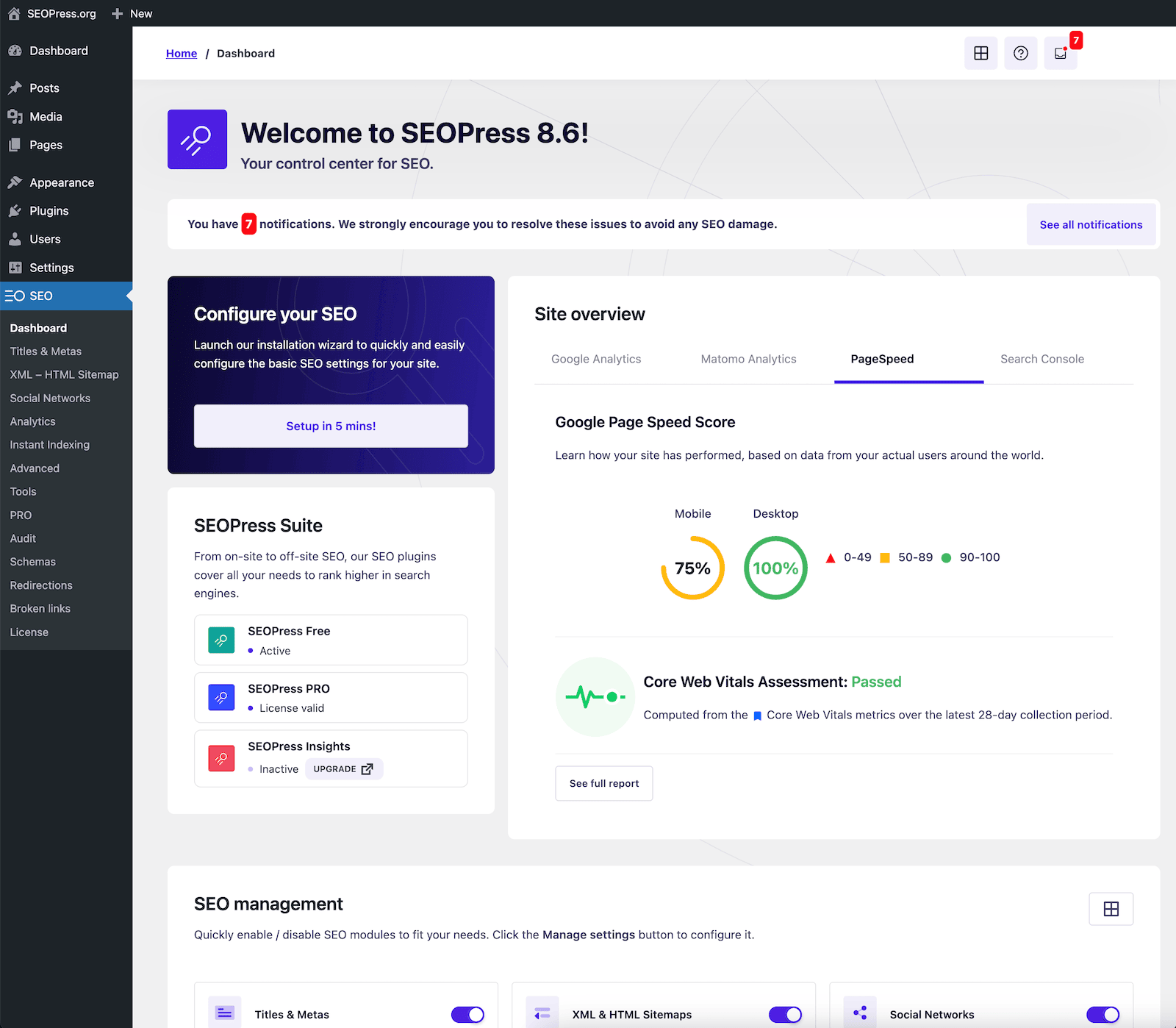
WordPress's core is not a single feature, but rather a comprehensive backend system centered around content production. It is open-source at the licensing level, provides a complete content management chain at the product level, and offers a rich ecosystem of extensions and services.
4.1 Licensing Level: Clear Open-Source Attributes
WordPress's core software is released under the GPL series of licenses, providing it with a clear foundation of open-source rules and establishing the institutional prerequisites for a thriving ecosystem.
4.2 Product Level: Content Management is a Default Capability
- Default content model is clear: posts, pages, media, users, and permissions.
- Complete release workflow: Preview and rollback available from draft to live deployment.
- Unified Extension Path: Themes handle presentation, plugins handle functionality.
![Image [4] - Open-Source CMS Deep Dive: Mastering WordPress' Core Positioning](https://www.361sale.com/wp-content/uploads/2025/12/20251220182217407-WordPress_6.4_Dashboard.png)
5. Examining WordPress's Position in the Open-Source CMS Industry Through Data
When discussing positioning, market scale serves as a crucial objective benchmark. According to W3Techs' statistics page, WordPress powers 60.21% of websites using identifiable CMS platforms, translating to approximately 43.01% of all websites across the entire internet. Such data is typically updated daily, making it suitable as a recent reference metric. During your selection process, you can interpret this figure as an indicator of ecosystem maturity and talent density.
5.1 What These Numbers Mean for Webmasters
- Rich resources: Tutorials, case studies, and troubleshooting tips are easier to find.
- Ecosystem Enhancement: More Abundant Supply of Themes, Plugins, Service Providers, and Developers
- Upgrade paths are more predictable: mainstream products generally prioritize compatibility and maintenance.
6. WordPress's Position in Open-Source Content Management Systems
To be more precise, WordPress is a versatile content platform. It's equally suited for individuals and small teams to get online quickly, as well as for building content into long-term assets and gradually evolving into more comprehensive business sites through plugins and themes.
6.1 Its Typical Ecological Niche
- Content Website Platform: Blogs, Media, Columns, Tutorials, Knowledge Base
- Corporate Content Hub: News, Case Studies, White Papers, Event Pages—Long-Term Repository
- Marketing Growth Toolkit: Forms, Subscriptions, SEO, Analytics, Landing Page Components
- Lightweight Business Site:Member ContentCourse Content, Simple E-commerce, and Event Registration
7. Plugins and themes make it like building blocks
WordPress rarely operates in its "pure form" for extended periods. Most sites utilize plugins to enhance SEO, performance, security, and form functionality, while themes determine visual design and layout. The key lies in keeping it lean and focused, avoiding redundancy and loss of control.
![Image [5] - Open-Source CMS Deep Dive: Mastering WordPress' Core Positioning](https://www.361sale.com/wp-content/uploads/2025/12/20251220182230251-WordPress_PluginsAvailable.png)
7.1 Practical Rules for Plugin Selection
- For capabilities within the same category, retain only one primary plugin whenever possible to avoid feature duplication.
- Prioritize plugins that are actively maintained, have a consistent update schedule, and are compatible with the latest core version.
- Test in a staging environment before deployment, especially for caching, security, and editor-related plugins.
8. Block editors make content creation more modular.
Content operations extend beyond writing long-form articles to encompass special feature pages, landing pages, and modularized text-image structures. Block editors transform paragraphs, images, buttons, lists, and quotes into movable, reusable modules, enabling content teams to standardize layouts more easily and boost production efficiency.
![Image [6] - Open-Source CMS Deep Dive: Mastering WordPress' Core Positioning](https://www.361sale.com/wp-content/uploads/2025/12/20251220182236451-image.png)
8.1 Writing and Formatting Methods More Suitable for Content Teams
- Clearer paragraph structure: Heading levels are easier to standardize.
- Module reusability: Common prompt boxes,CTAThe directory section can be designed as a fixed structure.
- Smoother collaboration: More controllable editing and proofreading workflows
9. WordPress Can Also Serve as a Content Management Platform
When you need a backend to distribute content to multiple frontends, you can use WordPress as the content source and then deliver content to different terminals via API. In this scenario, it functions more like a content hub rather than just a single website backend.
9.1 Common Use Cases
- One content backend, displayed across multiple platforms:official websiteApps, mini-programs, and shared content libraries
- Front-end Customization: Utilize front-end frameworks better suited to the business for presentation and interaction.
- Integration with internal systems: CRM, work order, and membership systems share content data.
10. Implementing the Checklist for Open-Source CMS
Choosing the right system is just the beginning; consistent performance depends on the process. The checklist below is ideal for establishing as a team's standard procedure.
10.1 Five Essential Tasks Before Launch
- Organize content structure: Categories, Tags, Section Entries, Static Pages
- Select themes: Prioritize readability and performance; avoid heavy themes packed with features.
- Develop plugin strategy: For each category—caching, security, SEO, and forms—select one primary plugin first.
- Design Permissions: Least Privilege Principle—Editors do not possess administrator privileges.
- Backup and Recovery Drill: A backup is only a backup if it can be restored.
10.2 Five Habits to Maintain During the Operational Phase
- Fixed update schedule: Core, themes, and plugins will be updated separately after testing.
- Media Management: Standardize image dimensions and naming conventions, compress files before uploading.
- Performance Baseline: Cache Hit Rate, Page Volume, Slow Query Regular Checks
- Security Baseline: Strong passwords and two-factor authentication, limit login attempts, audit login records.
- Regularly review and remove unused plugins and themes to reduce the attack surface and maintenance burden.
11. Summary: WordPress is positioned as a versatile open-source content platform.
The value of open-source CMS lies in its controllability, scalability, and portability. WordPress has maintained its long-term central position among open-source content management systems because it makes content creation user-friendly while preserving ample room for expansion. For most content-driven websites, it often represents a more balanced choice between initial learning curve, ecosystem maturity, and long-term maintenance complexity.

Link to this article:https://www.361sale.com/en/83420The article is copyrighted and must be reproduced with attribution.















![Emoji[wozuimei]-Photonflux.com | Professional WordPress repair service, worldwide, rapid response](https://www.361sale.com/wp-content/themes/zibll/img/smilies/wozuimei.gif)

![Emoticon[baoquan] - Photon Wave Network | Professional WordPress Repair Services, Worldwide Coverage, Rapid Response](https://www.361sale.com/wp-content/themes/zibll/img/smilies/baoquan.gif)


 简体中文
简体中文  English
  日本語
日本語  Français
  Español


No comments