





The core value of using Google Trends to determine keywords is straightforward: it doesn't tell "how many searches", but it does tell "whether demand is up, down, seasonal, or just emerging". In this article, we'll focus on a set of executable methods: using trend curves, related topics andRelated EnquiriesThe keywords are filtered by region and category to determine if a keyword is worth investing in content and pages for the next 3-12 months.

1. First of all, let's be clear: what does Google Trends data really represent?
Before you start judging keywords with Google Trends, it is important to understand what it means by the data, otherwise it is easy to misjudge.
1.1 0-100 is not search volume, but relative heat
The curve of Google TrendsIt is a "normalized relative popularity" that is normalized for the selected time and region, and then scaled to a range of 0-100. It is used to compare "relative popularity", not absolute search volume.
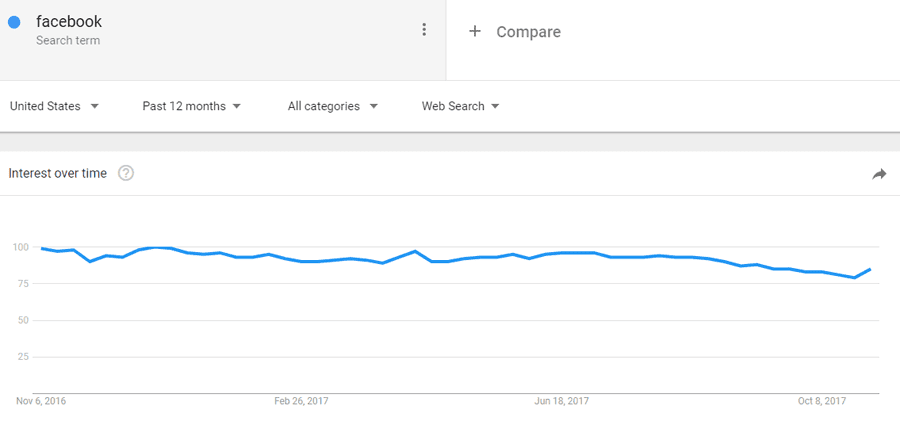
This leads to two important conclusions:
- Even if different regions show the same heat value, it does not mean that the search volume is the same.
- As soon as the time horizon changes, the shape of the curve may change as well, so use the same time window for comparisons.
1.2 "0" usually means insufficient data, not "no one searched"
When some of the points show very low or zero, the common reason is that there is not enough data or the magnitude is too small to conclude that there is no demand.
2. The first step of using Google Trends to judge keywords: first choose the right "comparison object" and "time window".
Many people fail to use Google Trends to determine keywords for reasons other thanartifactIt's not allowed, it's the way the comparison is made that's unstable.
2.1 Compare "similar words" first, do not compare words of different levels.
A more stable approach would be to put the candidates in the same decision range, for example:
- Similar terms: Model A vs Model B

- Similar terms in demand: how to X vs X tutorial
- Similarly converted words: best X vs X price (examples only, trade-offs by site strategy)
Google Trends supports comparing multiple search terms at once (interface "Add Comparison"), which is suitable for this kind of filtering.
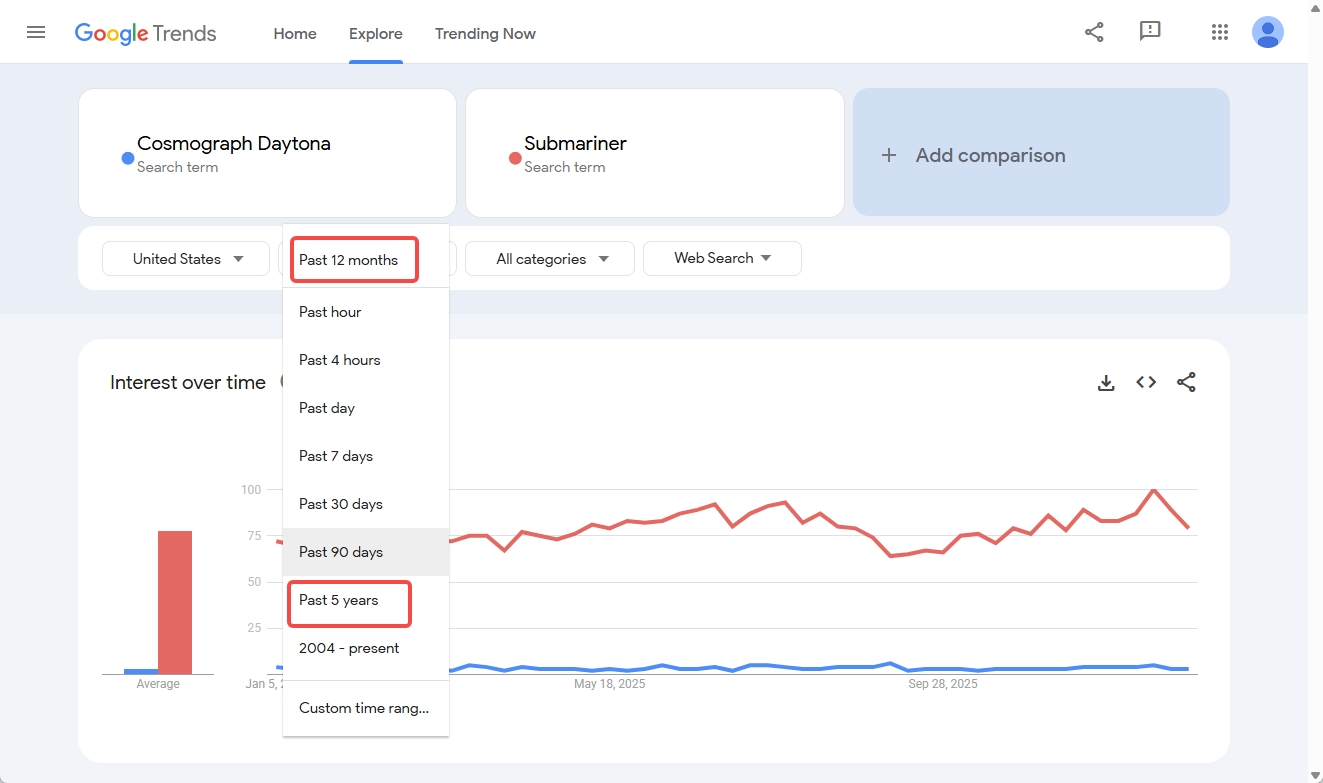
2.2 The time window suggests a "two-pronged view".
When making future value judgments, it is recommended to read at least two paragraphs:
- Last 90 days: Look for a recent upturn and a new wave peak
- Last 5 years: Look at long-term direction vs. seasonality for stability
![Image [4]-How to use Google Trends to determine the future value of keywords: accurate prediction of trends and traffic](https://www.361sale.com/wp-content/uploads/2026/01/20260106181643922-image.png)
Because Trends data are normalized to a chosen time frame, short periods can look at "recent changes" and long periods can look at "whether they are valid over time".
3. Judgment by Curve Patterns: 4 Common Trends and Corresponding Strategies
expense or outlay Google Trends When judging keywords, don't just look at "high", but also "like sustainable demand". The following table is suitable for direct use as a decision-making record.
| curved pattern | characteristic | Implications for future value | More suitable movements |
|---|---|---|---|
| stable ascent | Modest fluctuations but overall uplift | Demand is expanding and it is suitable to be put into the main page | Do core pages + series of internal links |
| Seasonal cyclic | Significant ups and downs in fixed months of the year | There is a cycle and missing the window would be a waste | Content 4-8 weeks in advance |
| event-driven | A sudden surge followed by a quick fall | Mostly hotspots, weak persistence | Suitable for short articles or news angles |
| Smooth low-wave type | Long-term low with occasional small fluctuations | May be niche or insufficient data | Combined with the station's data to determine |
The key here is to judge "sustainability" in terms of form, and then decide on the type of pages to invest in. This is more reliable than focusing on a particular peak.
4. Use "related queries/related topics" to determine: is the term getting bigger or narrower?
Just looking at the main word curve can sometimes be misleading. A more stable approach is to use Trends' "Related Topics" and "Related Queries" to verify whether demand is spreading.
4.1 Rising and Breakout are "growth signals", but don't misinterpret them!
Google Trends will give you the "Top" and "Rising" for the query in question; Rising means that the growth has been more pronounced over the selected period of time; if it shows "Breakout Rising means more significant growth over the selected period of time; if "Breakout" is shown, it means very large growth (officially over 5000%).
When using Google Trends to judge keywords, don't rush straight to the breakout when you see it:
- Let's extend the time window to 12 months or 5 years to see if it's just a short-term event.
- Look for multiple "long-tail terms in the same direction" in the Rising, if there is only one term breaking out, the risk is higher!
4.2 Using "diffusivity" to judge future value
A simple standard can be used:
- High diffusivity: Multiple different scenario words (tutorial, compare, fault, buy, alternatives) in relevant queries
- low diffusivity: Related queries are basically centered around the same event or the same brand name
The higher the diffusion, the more suitable it is for system content and internal link structure.
5. Filtering by "category and region": eliminating ambiguous terms and false positives
The most common pitfall when using Google Trends to determine keywords is "ambiguity". For example, if the same word is both animal and car brand, the curves will be mixed together.
5.1 Category filtering is used to "target context"
Google Trends supports filtering by category to help you look at the data in a context closer to your target industry.
If a word fluctuates a lot without categories and stabilizes when categories are added, this is usually an indication: the previous data is mixed with irrelevant people.
5.2 Regional filtering is used to "validate market consistency"
Google Trends also supports viewing regional heat and segmentation.
Especially useful for e-commerce and local services:
- If a term is only rising in a few regions, you can prioritize regional pages or regional content
- If there is a synchronized increase across multiple regions, it suggests that demand is more like "generalized growth"
Note: The heat values of different regions cannot be directly equated to the same search volume, which is One of Trends' official remindersThe
Summary:
The essence of using Google Trends to judge keywords is to answer a question: whether this demand is a "continuous demand" or a "short-term heat". As long as you first understand the relative meaning of 0-100, and then use the time window, related queries, categories and regions to do cross-validation, you can judge from the "feeling" into the "based on trade-offs".

Link to this article:https://www.361sale.com/en/85360The article is copyrighted and must be reproduced with attribution.






















![Emoji[wozuimei]-Photonflux.com | Professional WordPress repair service, worldwide, rapid response](https://www.361sale.com/wp-content/themes/zibll/img/smilies/wozuimei.gif)

![Emoticon[baoquan] - Photon Wave Network | Professional WordPress Repair Services, Worldwide Coverage, Rapid Response](https://www.361sale.com/wp-content/themes/zibll/img/smilies/baoquan.gif)


 简体中文
简体中文  English
  日本語
日本語  Français
  Español


No comments